
With SimpleIndex Barcode you can:
- Read barcodes printed on scanned paper documents
- Read barcodes embedded in PDF files
- Automatically rename files based on barcodes
- Export barcode data to CSV file or any database
- Separate multi-page documents with cover pages
- Recognize 2D formats like PDF417, DataMatrix, Aztec and QR Code
- Recognize 30 different 1D barcode formatsCode 39, Codabar, UPC, Code 128, EAN 13, 2 of 5, etc.
- Recognize postal barcodes like Planet, PostNet, Royal Post and Australian Post
- Lookup barcode values in a database for additional data
- Complete list of document scanning & indexing features
QR Code 2D barcode format for document indexing.
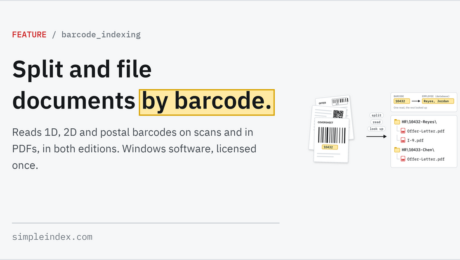
Barcode OCR: split, name and file documents by the barcodes on them.
Monday, 14 November 2022
by Simple Software
1-Click ProcessingBar Code ScanningBarcode Printing (Bar Code Printing)Barcode Recognition SoftwareCommand Line InterfaceCSVDocument IndexingDocument Separationoffline OCRon-prem OCRon-site OCROne-time payment OCRPatch CodePDF Document ScanningPDF417QR CodeScanning Coversheet (SimpleCoversheet)Scanning SoftwareSearchable PDF OCRSelf-hosted OCRServer ProcessingSubscription free OCRSunshine OCR (Sunshine Software)Unattended
No Comments
What are some other terms for Bar Code Scanning Software?
Monday, 29 July 2019
by aaron
Please refer to the Wiki Documentation for the complete Bar Code Recognition reference. People searching for software to read bar codes from scanned documents, or create document separator sheets for batch scanning operations, can use a variety of terms to find what they are looking for. This page helps you find Bar Code Scanning Software on our website. Related
Can SimpleIndex read bar codes from existing PDF files?
Wednesday, 28 February 2018
by dwilder
Please refer to the Wiki Documentation for the complete Bar Code Recognition reference. There are 2 types of PDF files. PDFs created by scanning applications use images, while PDF files created by software or printer drivers use text. SimpleIndex can read bar codes from either type of document. With image PDFs, SimpleIndex will use normal image barcode
- Published in Bar Codes, Import, Office PDF Text Processing
I cannot recognize PDF417 or QR Code bar codes. What does “Advanced “Only” mean?
Wednesday, 28 February 2018
by dwilder
Please refer to the Wiki Documentation for the complete Bar Code Recognition reference. This error applies to versions of SimpleIndex prior to version 7. All current versions of SimpleIndex include 2D barcode recognition. The Barcode and Professional licenses include the faster and more accurate Accusoft bar code recognition engine. In order to enable the Accusoft engine with
- Published in Bar Codes, Licensing & Installation
Can I split TIFF or PDF files based on barcodes as a separator and also name the file with the barcode value?
Wednesday, 28 February 2018
by dwilder
Please refer to the Wiki Documentation for the complete Bar Code Recognition reference. Yes you can split TIFF and PDF files using barcodes as well as name files using the values from barcodes. To do this simply create a barcode field and check the “Filename” and “Forward” options for that field on the Index tab. The “Filename”
- Published in Bar Codes, SimpleCoversheet
Will SimpleIndex read multiple barcodes on a page and save the value to the appropriate index field?
Wednesday, 28 February 2018
by dwilder
it can. By default barcodes on any page are read left to right and top to bottom. The first barcode read on the page will be filled into the first barcode field set up in SimpleIndex and so on. You can also narrow down results by matching against
- Published in Bar Codes
Is there a way to just use part of a bar code or OCR value? For example, extract “50” from the value “124450”
Wednesday, 28 February 2018
by dwilder
Please refer to the Wiki Documentation for the complete Bar Code Recognition reference. To do this example, create a barcode field (Field 1 for example) and a 2nd field with type “Fixed”. In the template for the 2nd field, enter %FIELD1[5,2]% to get “50” from “124450”. %FIELD1% would get the entire value for Field #1, the barcode
Automatic Data CaptureAutomatic Indexing SoftwareBar Code ScanningBar CodesBarcode OCRBarcode Reading SoftwareBarcode Recognition SoftwareClipboard OCRDocument ImagingDocument ScanningImage ScanningInvoice OCRKeyword IndexingOCR (Optical Character Recognition)OCR Form ProcessingOCR ScanningOffice PDF Text ProcessingPDF Barcode RecognitionPDF417QR CodeQuickBooks Document ManagementScanned Document IndexingScreen Scraping OCRScreenshot OCRTWAIN Scanning SoftwareZone OCR
- Published in Bar Codes, OCR, Office PDF Text Processing
How can I delete the barcode or blank page cover/separator sheet that I don’t need to save?
Wednesday, 28 February 2018
by dwilder
Please refer to the Wiki Documentation for the complete Bar Code Recognition reference. To delete any barcode page go into ‘Options’, to the ‘Barcode’ Tab and click the ‘Delete barcode page’ check box. Blank page deletion is done through the minimum file size threshold located in ‘Options’ in the ‘Batch’ Tab. The option is called ‘Min. File
- Published in Bar Codes, SimpleCoversheet
Some pages in my documents have unwanted barcodes that are being read. How can I exclude these from recognition?
Wednesday, 28 February 2018
by dwilder
Please refer to the Wiki Documentation for the complete Barcode Options reference. There are several methods for doing this. The fastest, most effective method is to enter a Template for your barcodes to ensure only barcodes that match a specific pattern will be used for that field. Unfortunately it is not always possible to define a template
- Published in Bar Codes
How can I use barcodes or blank pages as Document Separators.
Wednesday, 28 February 2018
by dwilder
th
- Published in Bar Codes, SimpleCoversheet
Why are my barcodes not being recognized properly?
Wednesday, 28 February 2018
by dwilder
Several factors can affect barcode recognition. -Scan in Black & White instead of color. Barcode recognition must convert color to B&W which can decrease quality. -Print barcodes with a laser printer. Dot-matrix barcodes are very difficult to read accurately. -Check your Zone settings. If there are zone coordinates defined for any barcode fields, only barcodes
- Published in Bar Codes
