FORGOT YOUR DETAILS?

CREATE ACCOUNT

Get patient records
out from under paper, without sending them anywhere

Charts, claims, intake forms and imaging reports, read and filed on your own network. Recognition runs on your own hardware by default, and the AI can too. HIPAA · On-premise · Licensed once.

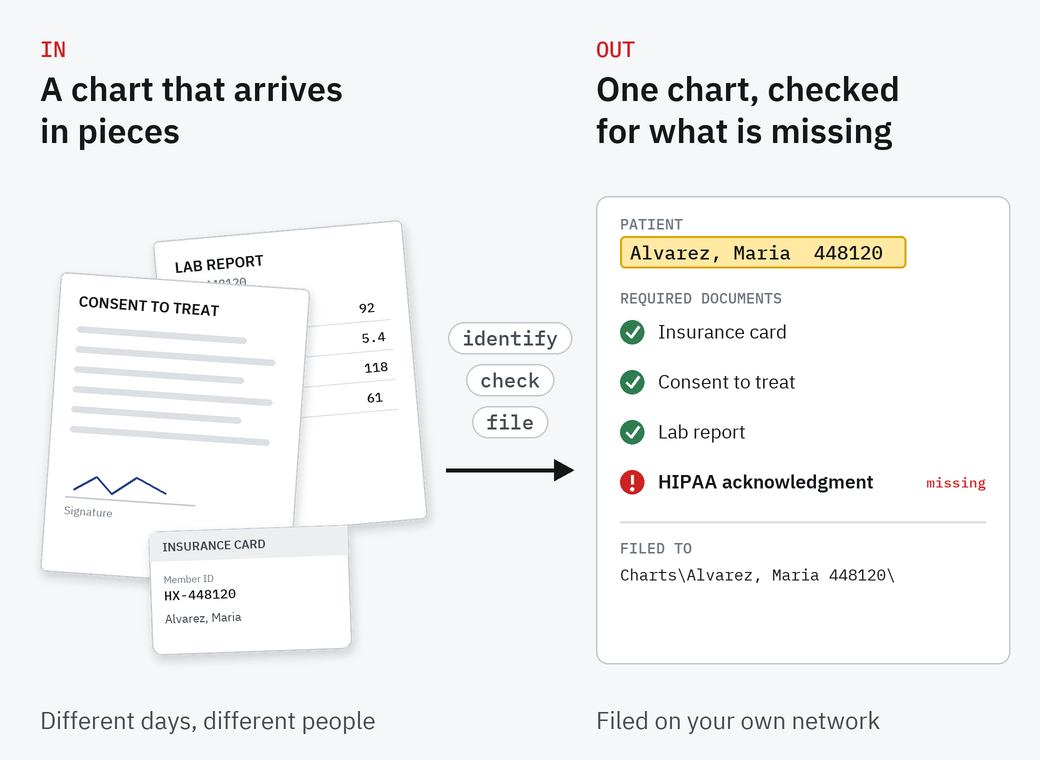
A patient chart arrives in pieces, a consent to treat form, a lab report and an insurance card, and goes through identify, check and file: the chart for Alvarez, Maria 448120 shows the insurance card, consent and lab report found, the HIPAA acknowledgment flagged as missing, and the folder it is filed to

A chart is never really one document. It's an intake form, an insurance card, a consent form, lab results, and a physician's notes, arriving at different times from different people. Front-desk staff end up as the safety net for whether the file is actually complete, and that's a bad job to give someone who's also answering phones.

SimpleIndex runs the recognition step instead: read what's on the page, check it against what the file is supposed to contain, and file it where your EHR or practice management system expects it. By default no scanned image leaves your own hardware.

What SimpleIndex does here

Six setups cover most of what a practice or hospital department needs from document capture. Each is the same software, aimed at a different part of the file.

Define what a complete intake file looks like, such as an insurance card, consent form, HIPAA acknowledgment and photo ID, and every batch is checked as it processes. A chart missing a signature comes back as a list, not a surprise during an audit.

Uses document presence auditing

Read payer, patient, claim number and amount off EOBs and remittance advices in whatever layout each payer uses, with a language model reading fields by their labels, and export them to your billing system.

Uses Professional · LLM OCR · database lookup

Look a patient up by the identifier on the page, confirm the match, and file the scan where your electronic health record or practice management system picks it up: a folder, a database, or an OnBase or Laserfiche import.

Uses ODBC/SQL · index autofill · export presets

Every processed page gets a text layer, so a chart pulled up six months later is searchable by content, not just by the folder someone filed it in.

Uses full-page OCR · searchable PDF

Hand-printed names, dates and boxes on intake and consent forms are read as index values, and ticked boxes come back as yes or no. Neat print reads well; flowing cursive is unreliable with any method.

Uses Professional · ICR · mark recognition

Compliance & records fit

The rules that shape a patient record today, and where this software sits against each one.

HIPAA
Recognition and filing run on hardware you control by default, so no outside service reads a patient record unless you choose one.
Cloud engines and providers
Textract and cloud language models are optional. If you use one, the pages you send it are processed by that provider, so check your agreement with them first. A model on your own server keeps everything in-house.
Minimum necessary
Pattern redaction blacks out values such as Social Security or member IDs in exported PDFs, for copies that go to someone who doesn't need them.
Retention schedules
Structured, named files with an index database beat a filing cabinet for proving you kept what you were required to keep.
what_if_yours_is_different

None of these is quite your workflow?

That's the normal case. Everything above is the same software configured differently for a particular kind of chart or claim.

Send us a handful of de-identified charts or claims forms and we'll build a working job from them, before the call, on your own documents.

We ask what you're processing because the answer changes what we'd show you.

How it goes
You tell us what you're processing
A short form. Document types, volume, where it needs to end up
We get in touch
Email or a call, whichever you prefer
We talk it through
What you need, and whether SimpleIndex is the right tool. Sometimes it isn't, and we'll say so
You send sample documents
Real ones, redacted if they need to be
We build a working job
On your files, and run it with you
What it costs
Nothing unless you buy. If you do, the setup is billed at the consulting rate

Before you scan the charts.

Is SimpleIndex HIPAA compliant?

HIPAA compliance is about how your organization handles patient information, so no software is compliant on its own. SimpleIndex helps by keeping recognition and filing on your own hardware by default, so no outside service reads the pages unless you choose one.

Do patient records leave our network?

No, unless you choose a cloud engine. SimpleOCR, Tesseract and ABBYY FineReader run on your own computer. Textract and cloud models such as ChatGPT are optional; if you use one, check your agreement with the provider first.

Can we use AI without sending patient data out?

Yes. Point the job at a model on your own server, through Ollama, LM Studio or vLLM. It runs with no internet connection at all.

Can it read handwritten intake forms?

Neat hand print, yes, and how well depends on the writing and the engine. Cloud engines and language models read free handwriting best, but no method reads flowing cursive reliably. See handwriting recognition.

Can it redact Social Security or member IDs?

Yes, in Professional. Give an index field a pattern, turn on Redact Matches, and each matching value is blacked out in the exported PDF. Check redacted files before you share them.

Does it work with our EHR?

It files scans where your EHR or practice management system picks them up: a watched folder, a database through ODBC, or an import module such as OnBase or Laserfiche. It doesn't need an API from the EHR.

What about CMS-1500 and UB-04 claim forms?

SimpleIndex reads claim fields like any other form. If you process CMS-1500 or UB-04 claims at high volume, we also offer a dedicated claims solution, HealthClaimsOCR, on its own site.

Which edition do we need?

Professional covers everything on this page, including the AI engines, handwriting and redaction. Searchable PDFs also work in Standard.

Try it on your own documents.

The free trial runs the full software on your own files, and our team in Knoxville can help you set up the first job.

TOP
