
Forms processing with SimpleIndex
SimpleIndex reads paper and PDF forms: hand print in boxes, tick boxes and bubbles, printed fields, barcodes and signatures, all in one pass. It checks each value, stops anything doubtful for a person, and sends one row per form to a spreadsheet, a database or your document system. It runs on your own network, with one license per workstation and no fee per page unless you choose a cloud engine.
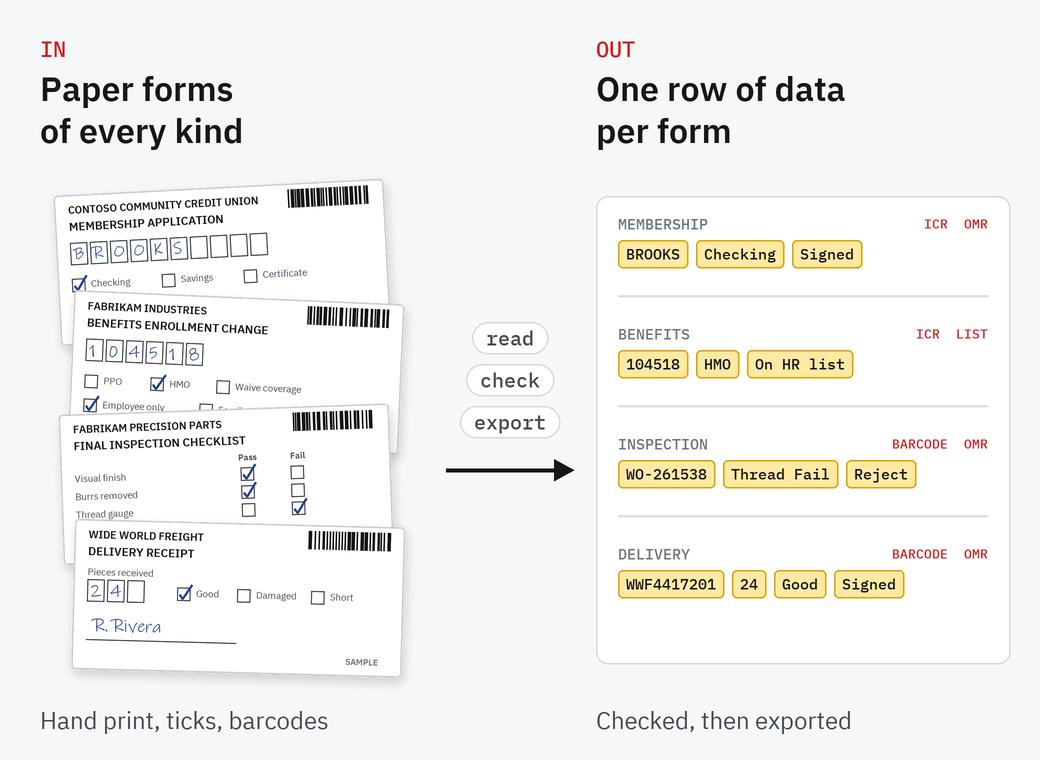
Most organizations still take in paper forms: applications, enrollment changes, checklists, delivery receipts, surveys. Someone types each one into a system and files the paper. SimpleIndex does the reading and the filing, and leaves people the forms it isn't sure about.
How SimpleIndex reads a form
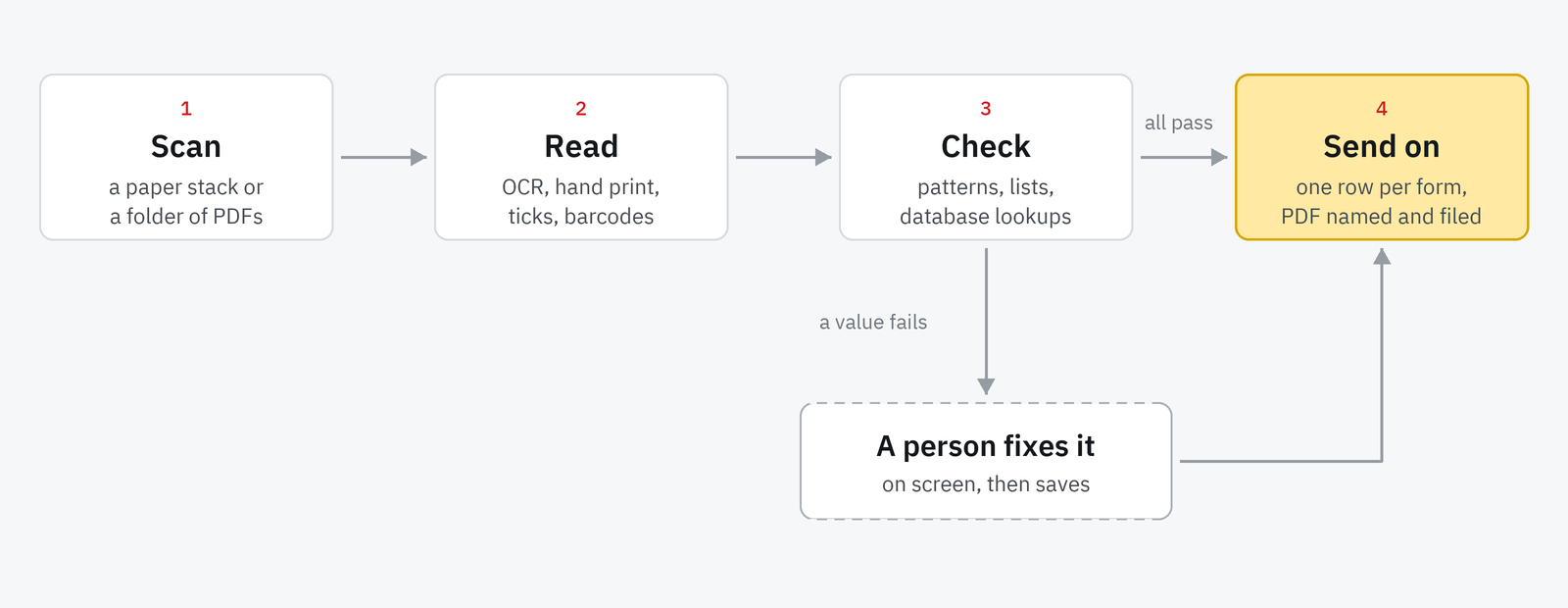
You set up each form once in the SimpleIndex Configuration Wizard: draw a zone around each field and say how to read it.
Scan or drop in PDFs
A stack from the office scanner, a folder of emailed PDFs, or fillable PDF forms.
Read each field
Zone OCR for printed text, the FineReader engine for hand print in boxes, a pixel count for tick boxes, bubbles and signature boxes, a barcode reader for form and work order numbers.
Check
Each value is held to a pattern, such as six digits or a date, and can be looked up in a list or a database. Anything that fails stops on screen for a person to fix.
Send it on
One row per form to a CSV file or a database, the PDF named and filed by its values, or an import for your document system.
Eight forms, eight ways of reading them
One form from each of eight industries, and between them every kind of mark a form carries. Each was printed, filled in by hand with a mix of pens, scanned in our office and read in SimpleIndex 12. The numbers are from those runs.
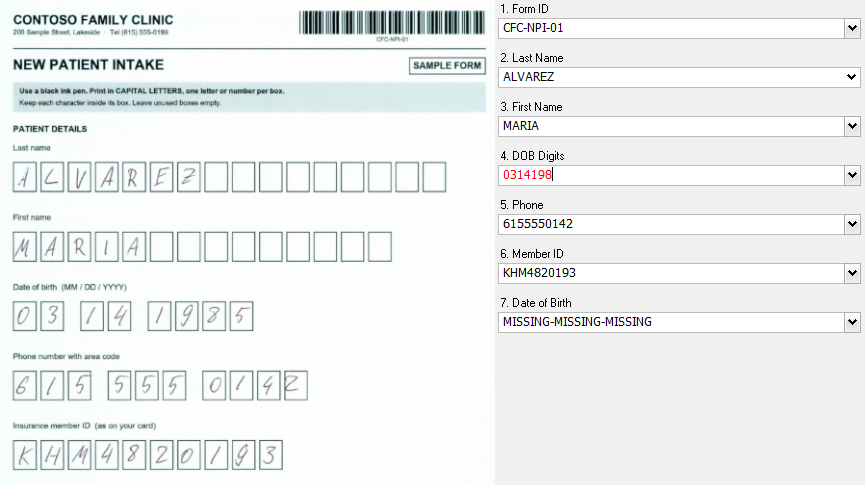
New patient intake
Names and dates printed by hand in boxes are read by the FineReader engine in Professional. A date it can't read cleanly stops on screen in red for the front desk to type. Our run: 8 forms, all 16 names read; most dates of birth stopped on screen. Healthcare
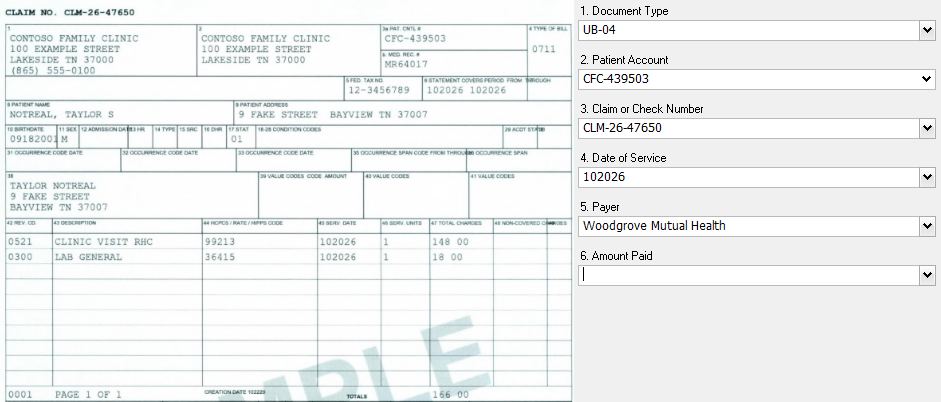
Hospital claim form
Printed fields always sit in the same place on a UB-04 or CMS-1500, so zone OCR reads them straight off the layout and the claim is filed under the patient account. Our run: 12 sample claim and EOB pages, all filed with every value right. Healthcare
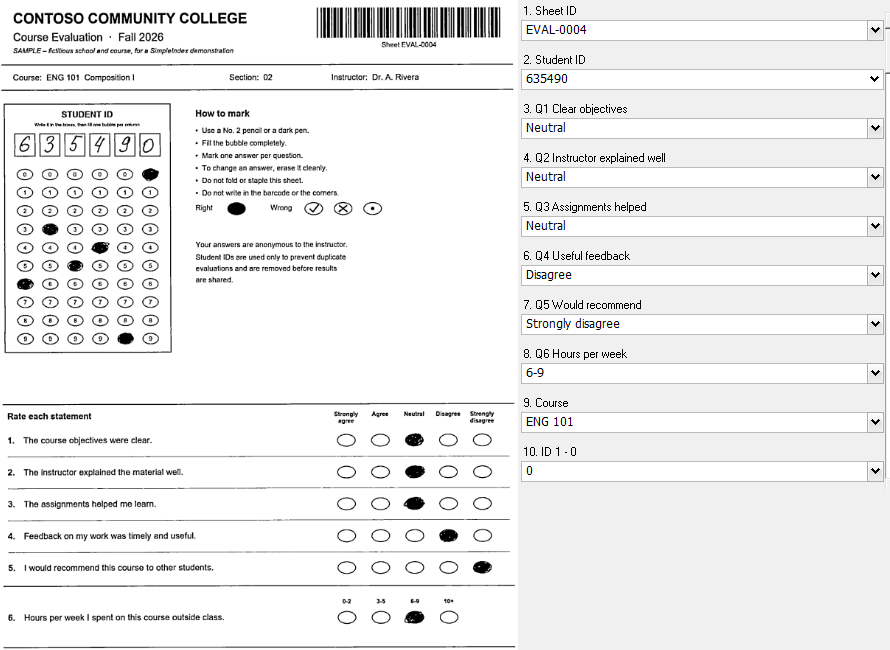
Course evaluation
SimpleIndex counts the dark pixels in each bubble, so every row of bubbles becomes one answer in the log: "Agree", "No answer" or "Multiple". Our run: 8 sheets; the 6 filled with dark marks read 42 of 42, while light pencil stops for a person. Education
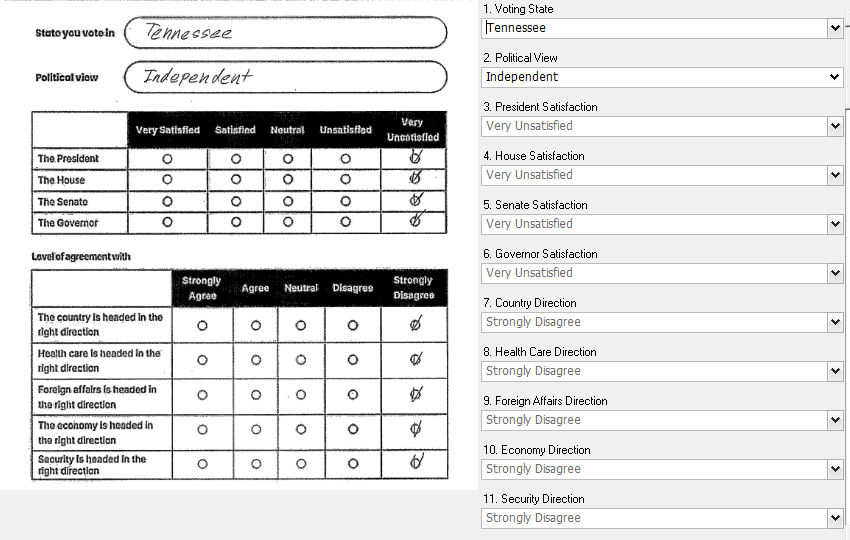
Canvassing survey
The nine tick-box answers are read on your own computer. The state and political view are written freely on a line, which local engines can't read reliably, so this job sends the page to AWS Textract, a cloud engine you switch on per job. Each survey becomes one row for the campaign. Our run: 6 surveys, all 54 ticks and all 12 written answers right. Canvassing and political surveys
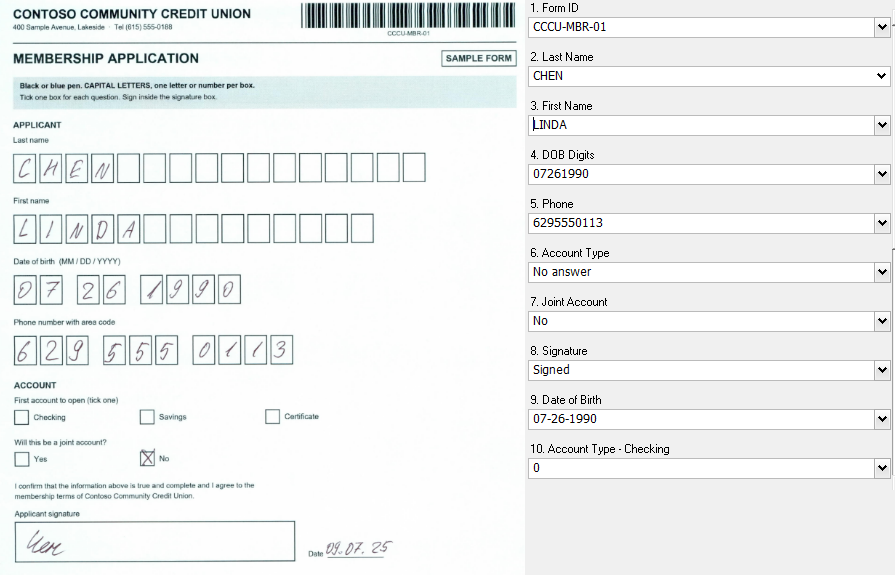
Membership application
Tick boxes give the account type, and a pixel count in the signature box tells a signed form from an unsigned one before anyone opens it. Our run: 8 forms, 54 of 56 values right, every tick and signature among them, the blank answer and the unsigned form included. Financial services
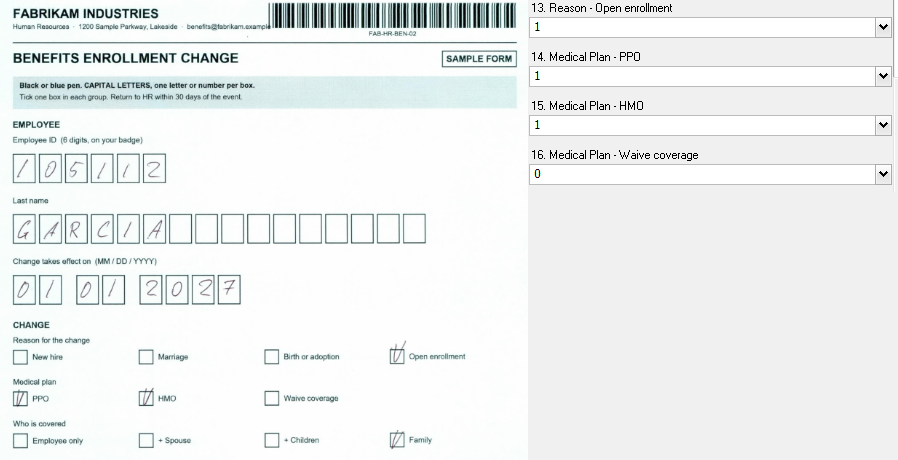
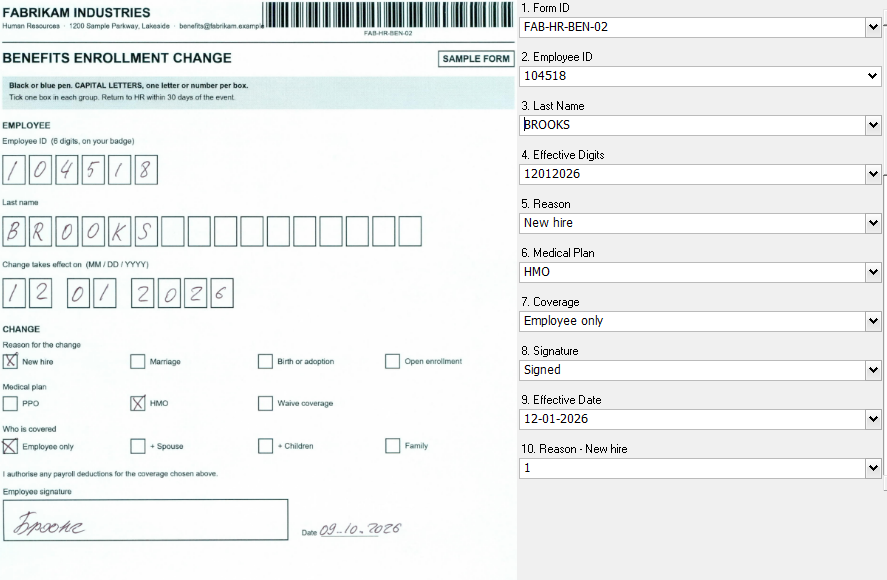
Benefits enrollment change
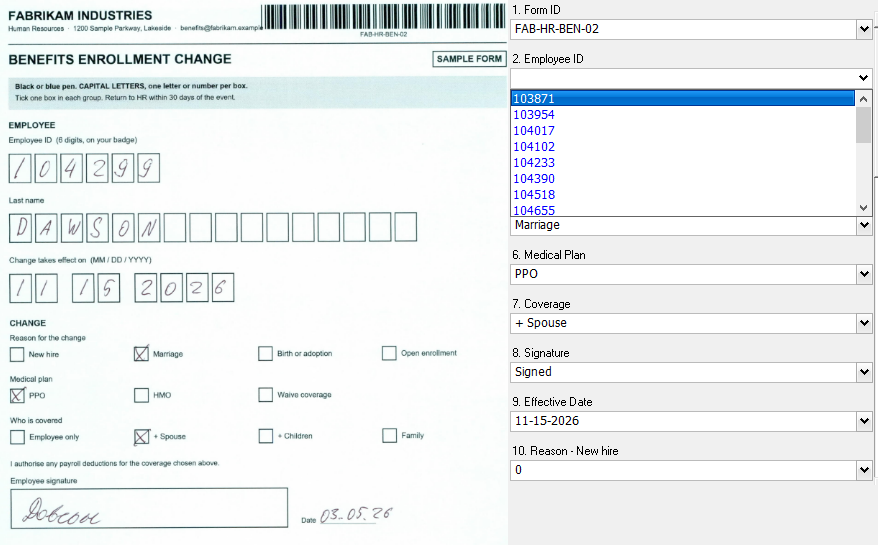
The employee ID is checked against the HR list as it is read. An ID that isn't on the list is left blank, and the form can't be saved until someone picks the right one. A form with two plans ticked, like this one, comes out as "Multiple" for HR to call about. Our run: 8 forms, 55 of 56 values right; the one miss is the ID that is not on the HR list, which stopped for a person. Handwriting recognition
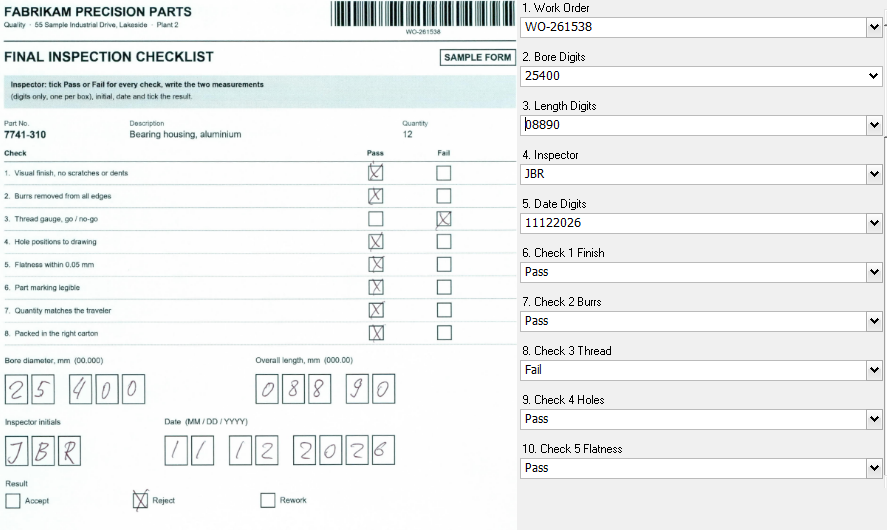
Final inspection checklist
The work order barcode names the file, and each Pass or Fail tick becomes its own column, so a rejected part shows up in the log at once. Our run: 8 checklists, all 72 Pass, Fail and result ticks right, 109 of 112 values in all. Manufacturing
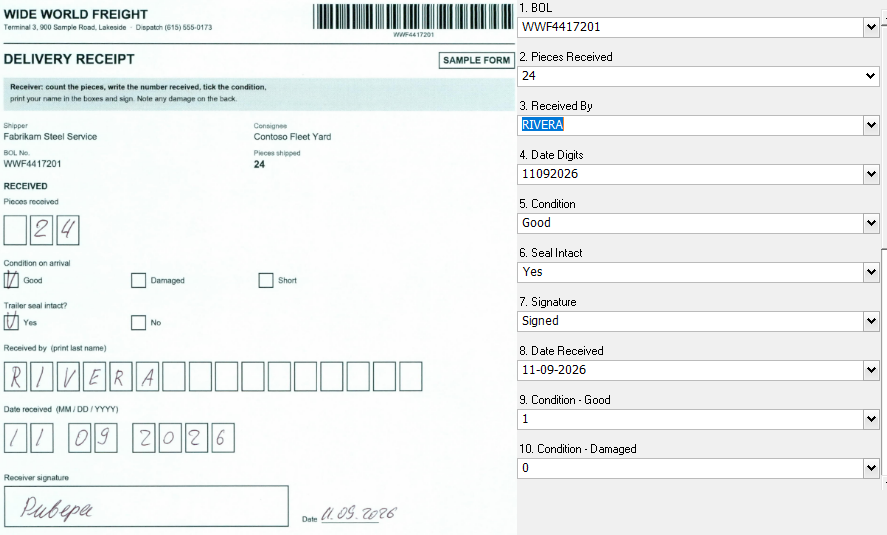
Delivery receipt
The BOL barcode, pieces received and the condition ticks come off the receipt together, with a check that the receiver signed. Our run: 8 receipts, every BOL, tick and signature right; 5 dates stopped for a person to type. Transportation
Sample forms made for SimpleIndex demonstrations. Contoso, Fabrikam and Wide World Freight are made up. Fillable PDF forms need no OCR at all: SimpleIndex reads their fields directly (PDF form filling).
Pick the way to read each field
A form usually mixes several kinds of field. Each zone gets its own setting, so one job reads all of them. OMR and hand print also work in SimpleIndex OCR, the edition with the FineReader engine, for people who already have it.
One form, start to finish
A benefits enrollment change, because every employer has one and it shows the check step best. Our test stack: 8 forms filled in by hand, one with an employee ID that isn't on the HR list, one with two medical plans ticked.
Scan the stack
HR scans the week's forms as one stack, in colour at 300 dpi, into the folder the job reads from.
Read each form
SimpleIndex reads the employee ID, last name and effective date from the boxes, and the reason, plan, coverage and signature from the ticks.

Check the employee ID
Each ID is looked up in the HR list as it is read. 104299 isn't on it, so the field is left blank and the form can't be saved until someone picks the right ID from the list. The form with two plans ticked shows "Multiple", so it is clear what needs a phone call.

One row per form
Each form is saved as a PDF named by employee ID, name and date, and its values go into the index log, which opens in Excel as one row per form. The same log can go into a database or your HR system's import.


Forms that read well
Print at Actual size. Our office printer shrank a form to 96% on "fit to page", and every box moved off its zone. Print at 100%, or set the zones from a scan of a printed copy. Boxes for hand print, one letter or digit each: FineReader reads hand print in boxes far better than free writing on a line.
A dark pen or pencil. A ballpoint tick counted 144 dark pixels or more, an empty box fewer than 10. Light pencil came close to an empty bubble's outline and had to be checked by a person.
Scan in colour at 300 dpi. Colour kept faint pencil marks that black and white lost.
Test a few filled forms first. Fill in five or ten copies the way your people really will, run them, and adjust before the first real batch. For bubble sheets in detail, see OMR.
Tests and grading
SimpleIndex reads answer sheets and course evaluations into data, one row per sheet. For grading large tests with scores and reports, see the SimpleOCR forms processing guide.
On your own network, for one price
Forms are read on your own computers and servers. Nothing is sent to a cloud service unless you switch one on for a job, as the canvassing survey above does.
SimpleIndex Standard reads printed fields and barcodes. SimpleIndex Professional adds tick boxes, bubbles, signature boxes and hand print, and is $1,800 per workstation including the first year of support, then $300 a year. You buy each license once. The local engines have no charge per page; a cloud engine such as Textract is billed per page by its provider. Compare the versions.
Send us a few forms
Ten filled copies of one form, or a blank one and how it is filled in. Black out real names and numbers first, or fill a few copies with made-up details.
We build a job for it and show you the result on a 20-minute call, on your own forms.
We ask what you are processing because the answer changes what we would show you.
Questions about forms processing
How many forms a month make it worth it?
It depends on how long your people spend typing forms in now. The license is bought once per workstation, and the local engines have no charge per page, so a busy month costs nothing extra. Send us a few forms and we'll show you the time it takes.
Which forms can it read?
Any form with a fixed layout: applications, enrollment and change forms, checklists, receipts, surveys, evaluations, claim forms. Each layout is set up once.
Can it read handwriting?
Neat hand print in boxes, yes, with the FineReader engine in Professional. Free writing on a line needs a cloud engine such as Textract, and joined-up writing isn't read reliably by any method, so anything doubtful stops on screen. See handwriting recognition.
What happens with a blank, a double tick or a missing signature?
Each is written into the data as "No answer", "Multiple" or "Missing", so you can sort them out in the log or stop them on screen.
Do we need special forms or scanners?
No. Plain paper and any office scanner that saves PDF or TIFF. Forms with boxes for hand print, printed at actual size, read best.
Can it read fillable PDF forms?
Yes, directly from the PDF's own fields, with no OCR. See PDF form filling.
Can it grade tests?
It reads answers into data. For scoring and reports on large tests, see the SimpleOCR forms processing guide.
Does anything leave our network?
No. SimpleIndex reads the forms on your own computers. A cloud engine such as Textract is an option you switch on per job.
Try it on your own documents
The free trial runs the full software on your own files, and our team in Knoxville can help you set up the first job.