FORGOT YOUR DETAILS?

CREATE ACCOUNT

Government and public sector document scanning

For counties, cities, courts, state agencies and public authorities. SimpleIndex reads the number that matters on each page, a parcel, permit, instrument or case number, and files a searchable PDF in the right folder with an index of what it read. It runs on your office's own computers, for one price per workstation, with no subscription and no fee per page unless you choose a cloud engine.

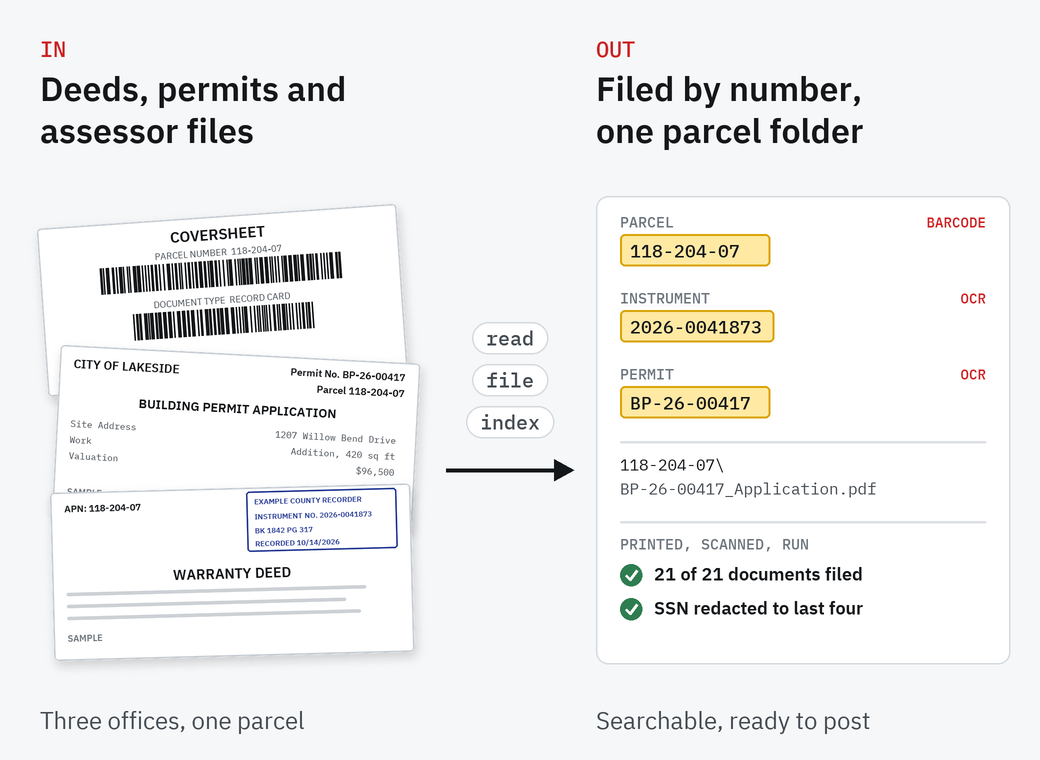
A sample assessor coversheet, a City of Lakeside building permit application and an Example County warranty deed go through read, file and index: parcel 118-204-07 read from the barcode, instrument 2026-0041873 and permit BP-26-00417 read from the pages, filed in the folder 118-204-07; 21 of 21 documents filed and the Social Security number redacted to the last four digits

Your land records system, permitting software or assessment system holds the record. The paper still comes over the counter and in the mail, and older files fill shelves and basements.

SimpleIndex turns that paper into named, searchable files and an index your system can import. It does not replace the system you already run, and it does not need a project team to set up.

What it takes

Cost. One license per workstation, the first year of support included, then a yearly renewal. No subscription, and no fee per page with the local OCR engines; a cloud engine such as AWS Textract or a cloud AI model is billed per page by its provider. Purchase orders accepted.

Effort. One Windows PC and the scanner you already have. Staff put a printed coversheet in front of a document, or nothing at all when the number is on the page. Every value can stop on screen for a check before it is saved. We build your first job from ten of your own pages.

Fit with your rules. Files stay on your own computers; cloud reading only if you choose it. Searchable PDFs, filed by parcel, permit and document type, so each retention rule is easy to apply. Social Security numbers can be blacked out before images are posted online.

Records, office by office

Every office files by its own number. The software is the same; the job is set to the number and the documents you handle.

Recorded documents filed by instrument number. Book, page, recording date, parcel, grantor and grantee go into an index log you can load into your land records system. Social Security numbers can be blacked out before images go online.

Uses full-page OCR · redaction

Exemption applications, review requests, record cards and refund requests behind a barcode coversheet, filed by parcel and tax year. A 2025 and a 2026 review of the same parcel stay apart.

Uses barcode coversheets · OCR

Permit files by parcel and permit number: applications, plan reviews, inspection records and certificates of occupancy, one folder per parcel.

Uses full-page OCR · folders by parcel

Case files, citations and reports filed by case or citation number, from a separator sheet or from the page. Our legal page shows a case file split and Bates-numbered.

Uses separator sheets · Bates numbering

Filings and their attachments scanned in batches behind barcode coversheets, each named by its filing number and type.

Uses barcode coversheets · batches

Minutes, agendas, resolutions and ordinances as searchable PDFs, filed by meeting date and document type, so a past decision is a search away.

Uses full-page OCR · searchable PDF
Example parcel_118-204-07

One parcel, three offices

We printed a sample county's paperwork, a recorder's returned documents, a city's permit files and an assessor's records, scanned it like any office would and ran it through SimpleIndex 12. 33 pages, 21 of 21 documents filed right, 92 of 92 index values right.

  1. Scan the stack

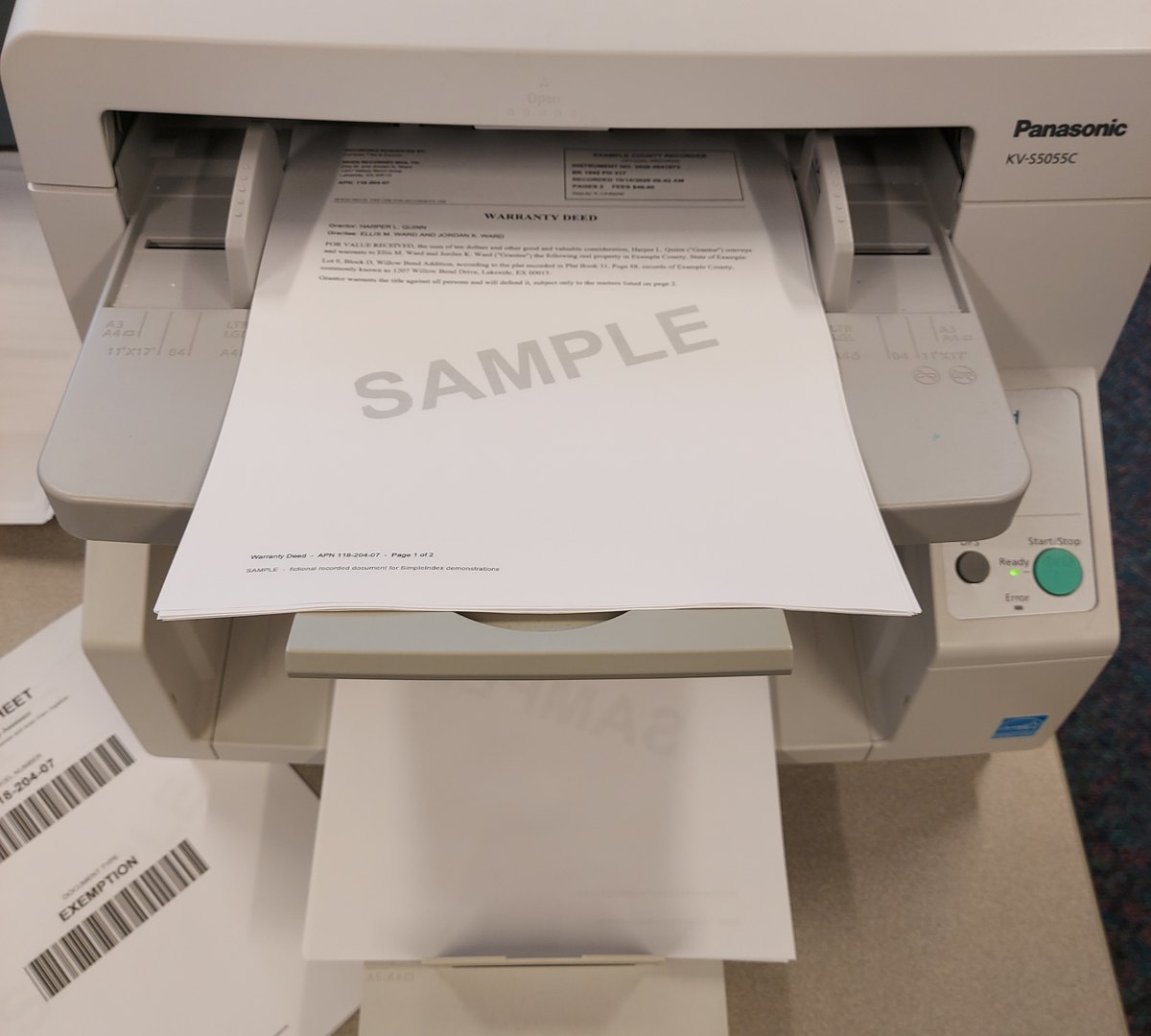
    The recorder's returned documents go through the scanner as one stack: deeds, a deed of trust, a release, a lien, an easement. No sorting first.

    A sample Example County warranty deed with the recorder's stamp in a document scanner feeder, an assessor coversheet with barcodes beside it
  2. Read the stamp

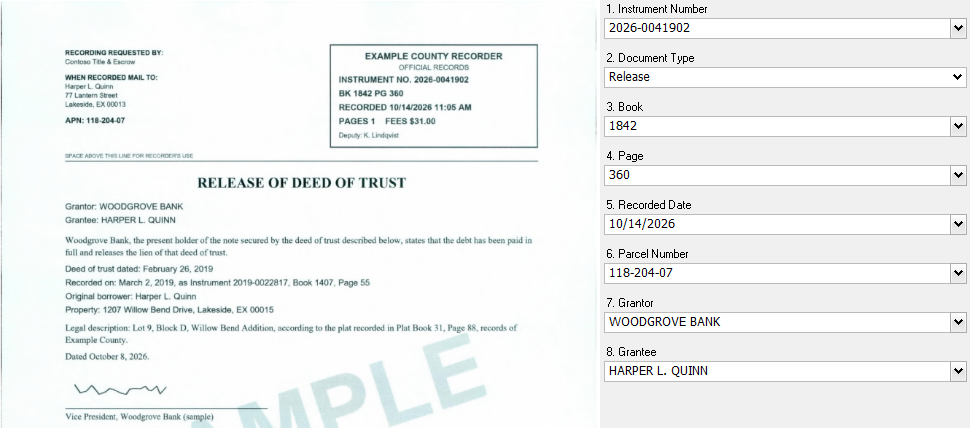
    SimpleIndex takes the instrument number from the recorder's stamp and the document type from the title. The release quotes an older instrument, 2019-0022817; it is filed under its own number, 2026-0041902.

    A sample release of deed of trust in SimpleIndex beside its index fields: instrument number 2026-0041902, document type Release, book 1842, page 360, recorded 10/14/2026, parcel 118-204-07, grantor Woodgrove Bank, grantee Harper L. Quinn
  3. File and index

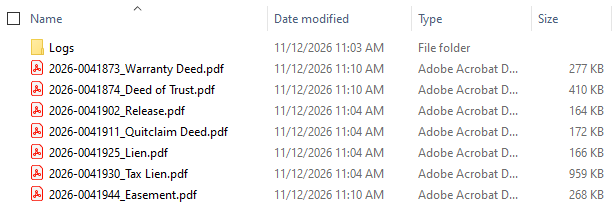
    Each document becomes a searchable PDF named by instrument number, and the index log lists book, page, recording date, parcel, grantor and grantee: a grantor-grantee index ready to import.

    Windows Explorer with seven PDFs named by instrument number and document type, from 2026-0041873_Warranty Deed to 2026-0041944_Easement
  4. The same parcel, two more offices

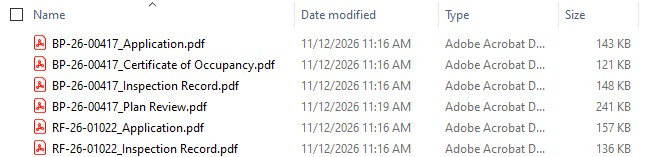
    The city's permit pages carry the permit and parcel numbers in their header, so they file themselves: two permits and six files in the folder for parcel 118-204-07. The assessor's files come behind a barcode coversheet, below.

    Windows Explorer at the folder for parcel 118-204-07: application, certificate of occupancy, inspection record and plan review for permit BP-26-00417, application and inspection record for permit RF-26-01022

A grantor-grantee index, ready to import

The index log from our run, opened in Excel: one row per recorded document, with the values read from the stamp and the page. Most land records systems can import a file like this.

The index log in Excel: seven rows with instrument number, document type, book 1842, pages 317 to 364, recorded date 10/14/2026, parcel number, grantor, grantee, SSN Redaction REDACTED for the tax lien, and page count

Sample records made for SimpleIndex demonstrations. Example County, the City of Lakeside and every name and number are made up.

Assessor files behind a coversheet

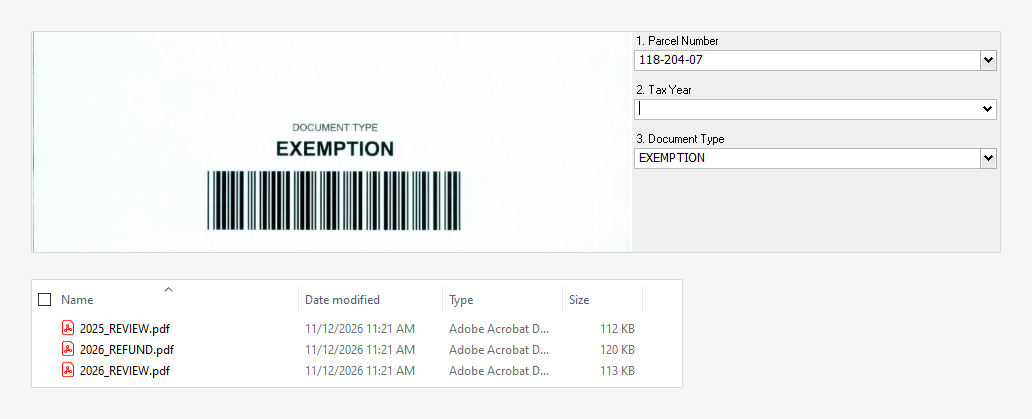
Exemption applications, review requests and refund requests carry no number SimpleIndex can trust, so a coversheet with the parcel and document type as barcodes goes in front of each one. SimpleIndex reads both barcodes, drops the sheet and reads the tax year off the page. Above, the coversheet for parcel 118-204-07; below, the folder for parcel 233-019-14, where a 2025 and a 2026 review stay apart.

A scanned coversheet with document type EXEMPTION beside the index fields, parcel 118-204-07 read; below, Windows Explorer with 2025_REVIEW, 2026_REFUND and 2026_REVIEW for parcel 233-019-14

Social Security numbers, out before posting

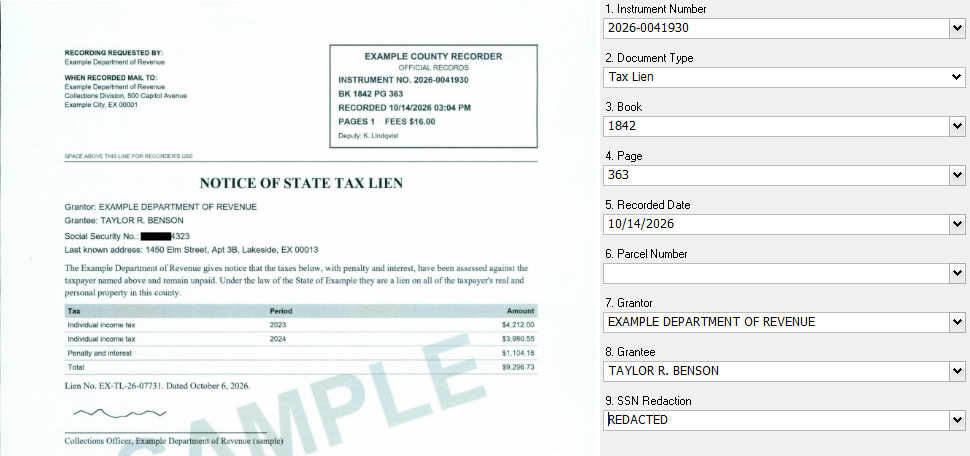
Liens, judgments and older deeds sometimes carry a full Social Security number. In our sample tax lien, SimpleIndex found the number as the page was read and blacked out all but the last four digits, in the scanned image and in the searchable text. The index log records only that a number was redacted.

A sample notice of state tax lien in SimpleIndex with the first five digits of the Social Security number blacked out and 4323 left, beside the index fields with SSN Redaction REDACTED

Redaction covers what OCR reads, so check redacted files before they are posted. It needs SimpleIndex Professional, version 12.0.200 or later.

Records rules and scanning

Retention is set by each state, and your office decides what to keep and how. SimpleIndex does not make an office compliant on its own; it files records so the rules are easy to follow.

Retention schedules
Each state sets how long each record is kept. Land records are generally kept permanently; permit files mix permanent records with ones kept for a few years. In Texas, for example, Local Schedule PW keeps the building master record permanently and inspection reports for 3 years. Filing by parcel, permit and document type makes each rule easy to apply.
Scanned copies as the record
Many states let an office keep the scanned copy in place of paper once its imaging meets the state's rules. Check your state's rules before paper is destroyed.
Personal numbers in online records
Some states, Florida among them (Fla. Stat. 119.0714), let anyone ask the recorder to redact a Social Security number from an image posted online. SimpleIndex can find and black out those numbers as documents are scanned.
Public records requests
Searchable PDFs filed by number turn a request into a search rather than a trip to the shelves.

Who uses it

County clerks and recorders, assessors and tax offices, city permit offices, courts, state agencies and public authorities use SimpleIndex. One state filing office has run it for 14 years.

Our software has also helped a prosecutor's office work through a very large document production in a major pharmaceutical case.

On your computers, for one price

SimpleIndex Professional is $1,800 per workstation, including the first year of support, then $300 a year. It reads numbers off the page and from barcodes and blacks out personal numbers, so every example on this page runs on it. No subscription. The local engines have no charge per page; a cloud engine such as AWS Textract or a cloud AI model is billed per page by its provider. Purchase orders accepted.

We build your first job

Send us ten pages of the records you want to scan, with personal details blacked out, or blank forms, and tell us how you file them today.

We build a SimpleIndex job that reads them and show it to you on a 20-minute call.

We ask what you are processing because the answer changes what we would show you.

How it goes
You tell us what you scan
Record types, volume, the number you file by
You send samples
Ten pages, personal details blacked out, or blank forms
We build a working job
On your records, before the call
We show you the result
A 20-minute call with the files named and filed
What it costs
Nothing unless you buy. If you do, the setup is billed at the consulting rate

Questions from records offices

What does it cost, and are there page fees?

One license per workstation: Professional is $1,800 including the first year of support, then $300 a year. There is no subscription, and the local engines have no charge per page; a cloud engine such as AWS Textract or a cloud AI model is billed per page by its provider, only if you choose one. Purchase orders are accepted.

Do we need IT staff or a server?

No. SimpleIndex runs on one Windows PC with the scanner you already have. A server add-on is there for offices that want large back files processed unattended.

Can we scan our back files as well as new records?

Yes. The same job files a box of old records and the day's new ones. For back files with no number on the page, a coversheet with the number as a barcode goes in front of each document.

Coversheets or reading the number off the page?

If the number is printed on the page, such as an instrument, permit or case number, SimpleIndex reads it there and no coversheet is needed. Coversheets suit forms and letters that carry no number, and they make each batch quick to check. See barcode recognition.

Can the index go into our land records or permitting system?

SimpleIndex writes an index log, one row per document, that most systems can import. It can also save into a watched folder, a SharePoint library or a database.

Can it black out Social Security numbers before records go online?

Yes, in Professional, version 12.0.200 or later. SimpleIndex finds each number as the page is read and blacks out all but the last four digits, in the image and the text. Check redacted files before they are posted.

Do our records leave the building?

No. Scanning, reading and filing happen on your own computers. Cloud reading engines are an option you turn on, never the default.

Which edition do we need?

Professional, for everything on this page. Offices that only read barcode coversheets can start with a lower edition; ask us and we will tell you which one fits.

Try it on your own documents

The free trial runs the full software on your own files, and our team in Knoxville can help you set up the first job.

TOP