
Test requisitions
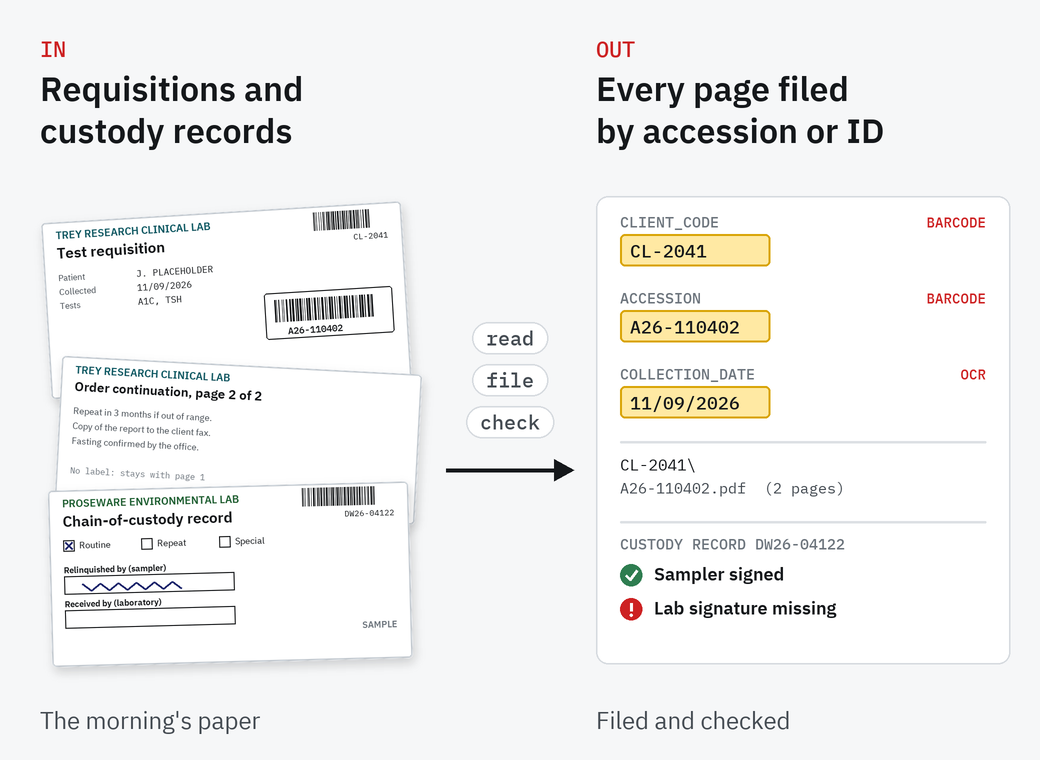
ConfigurationSimpleIndex reads the accession label and the client's account barcode, and files each requisition by accession number in a folder per client. A second page with no label stays with the requisition in front of it.
SimpleIndex reads the accession and sample ID barcodes on test requisitions and chain-of-custody records, and files every page under the number your LIS or LIMS already uses. It runs on your own network, with one license per workstation and no fee per page unless you choose a cloud engine.
The LIS or LIMS holds the order and the result. Paper still arrives with the specimens: requisitions in the bag, chain-of-custody records in the cooler, printouts from instruments, reports from reference labs.
Someone scans it, names it and files it, and goes looking for it when a client calls or an inspector asks. SimpleIndex does that part. It reads the ID already on the page and files the paper where your team looks for it. It doesn't replace the LIS or LIMS.
One kind of document at a time, with the same software and its own job settings for each.
SimpleIndex reads the accession label and the client's account barcode, and files each requisition by accession number in a folder per client. A second page with no label stays with the requisition in front of it.
The sample ID and system ID come from the barcodes. Tick boxes and signature boxes are checked as the record is filed, so a record with no lab signature shows up in the log, not at the audit.
Filed by instrument and run date, as searchable PDFs, so a run can be found when a result is questioned.
The accession number is found anywhere on the page, so preliminary, final and corrected reports end up under the same number.
A free starter job reads CAS numbers and files each sheet by vendor and product.
Files named by accession number, dropped in a folder your LIS or LIMS picks up, or looked up against its database first.
The sample paperwork behind this page, printed, filled in and scanned in our office: a clinical lab's test requisition in the scanner, and drinking-water chain-of-custody records beside a sample bottle.
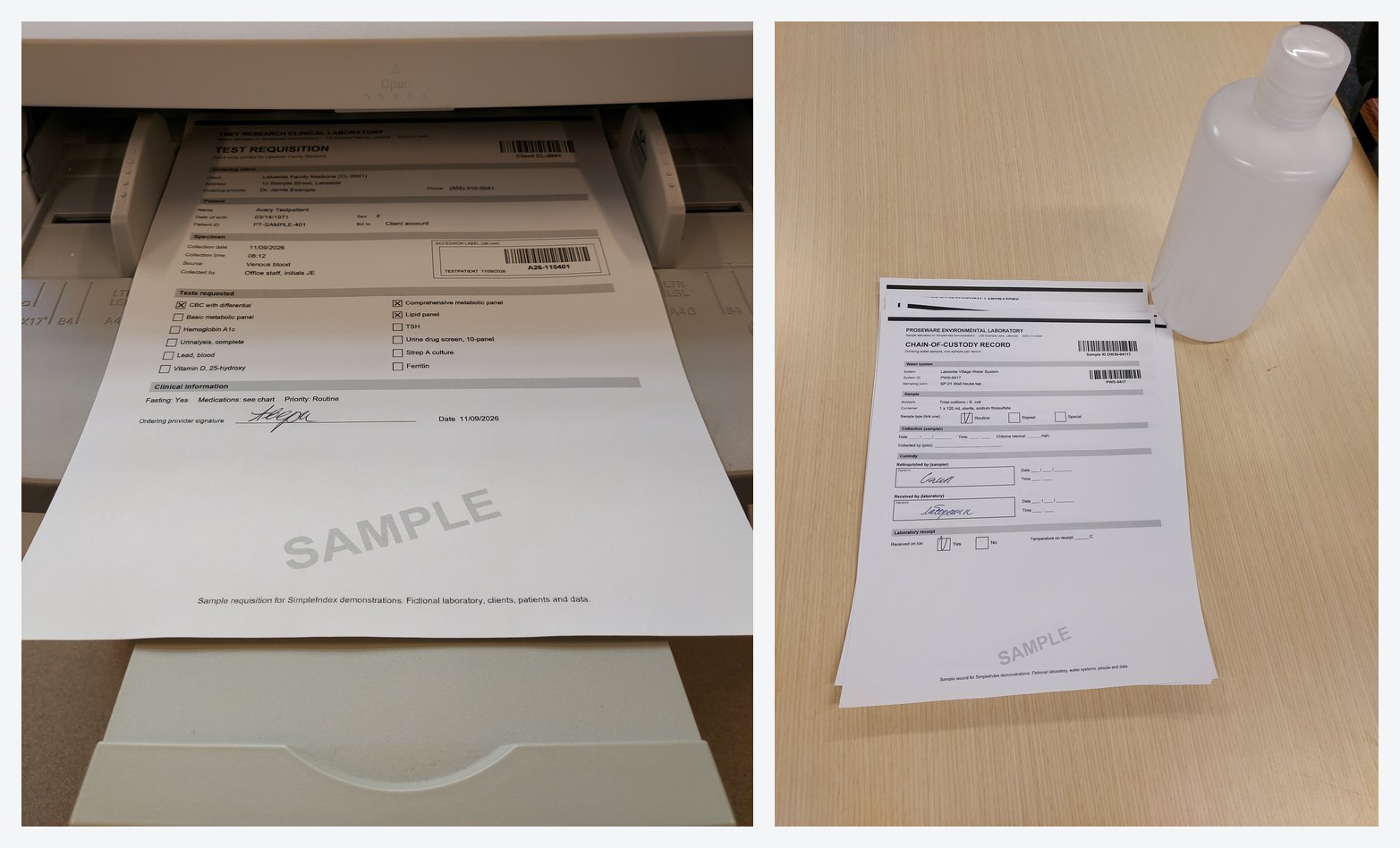
Sample paperwork made for SimpleIndex demonstrations. Every lab, client, person and number is made up.
Our test: 8 printed requisitions from three made-up clients, 10 pages with two continuation pages, scanned as one stack. All 8 were filed under the right client and accession number, both continuation pages stayed with their requisition, and every collection date was read.
Accessioning scans the morning's requisitions as one stack, labels on, in the order they came out of the bags.
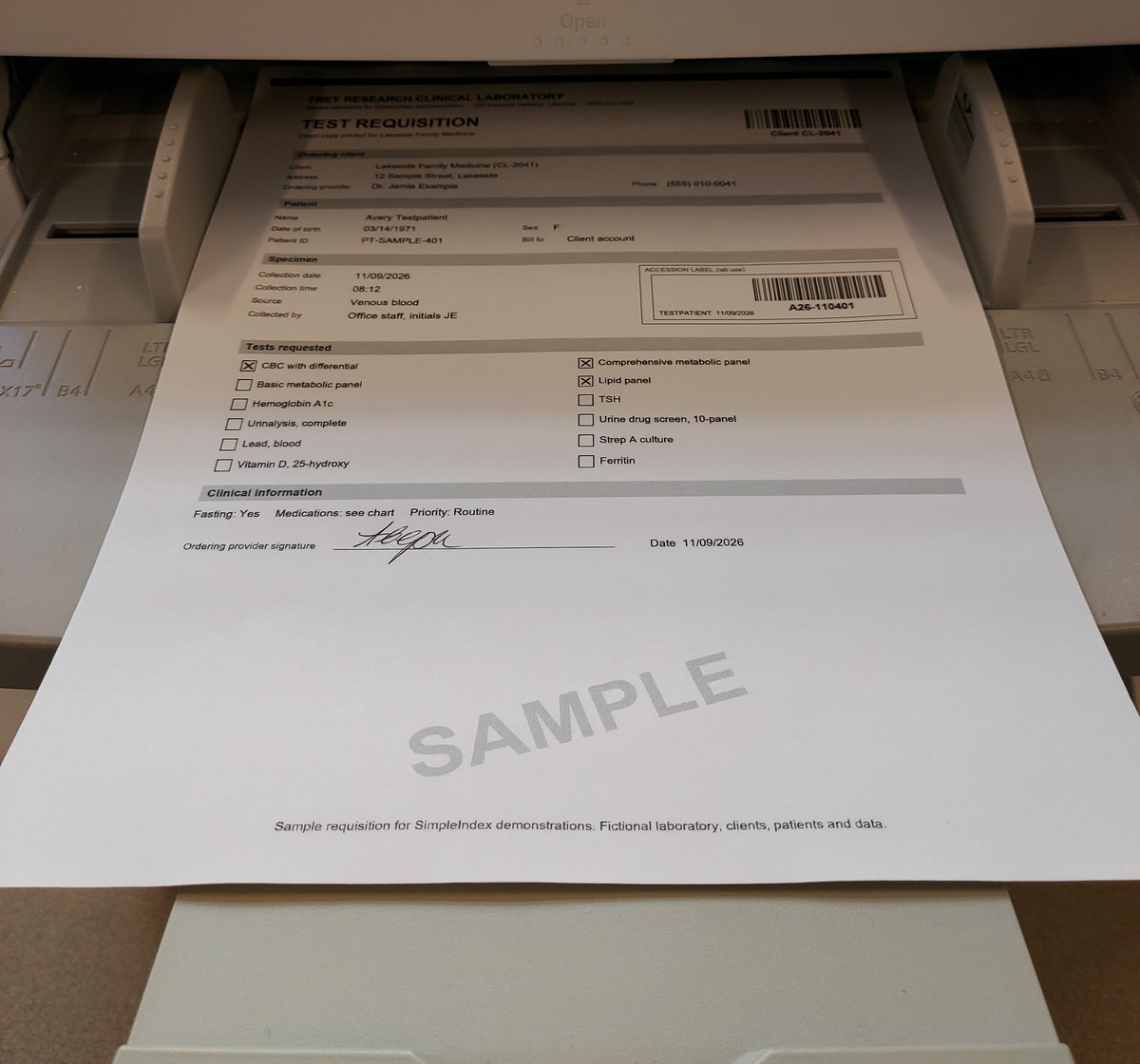
SimpleIndex reads the accession label and the client barcode on each requisition, and the collection date from the page. A page with no label, such as an order continuation, takes the values of the requisition in front of it.
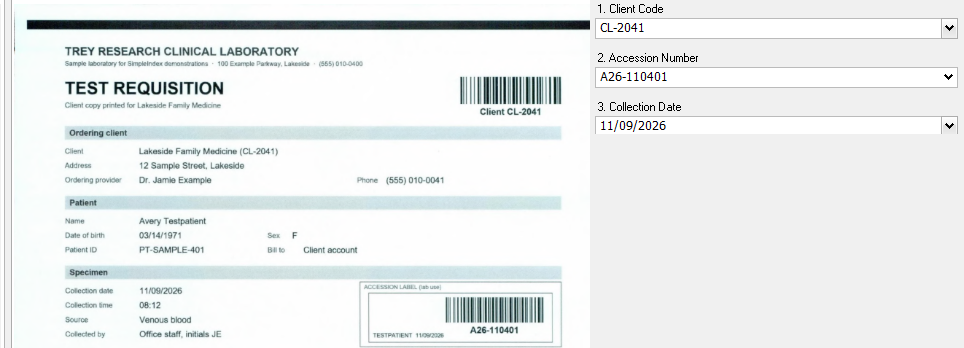
Each requisition is saved as a searchable PDF named by its accession number, in a folder for the client: CL-2041\A26-110402.pdf, with its second page inside.
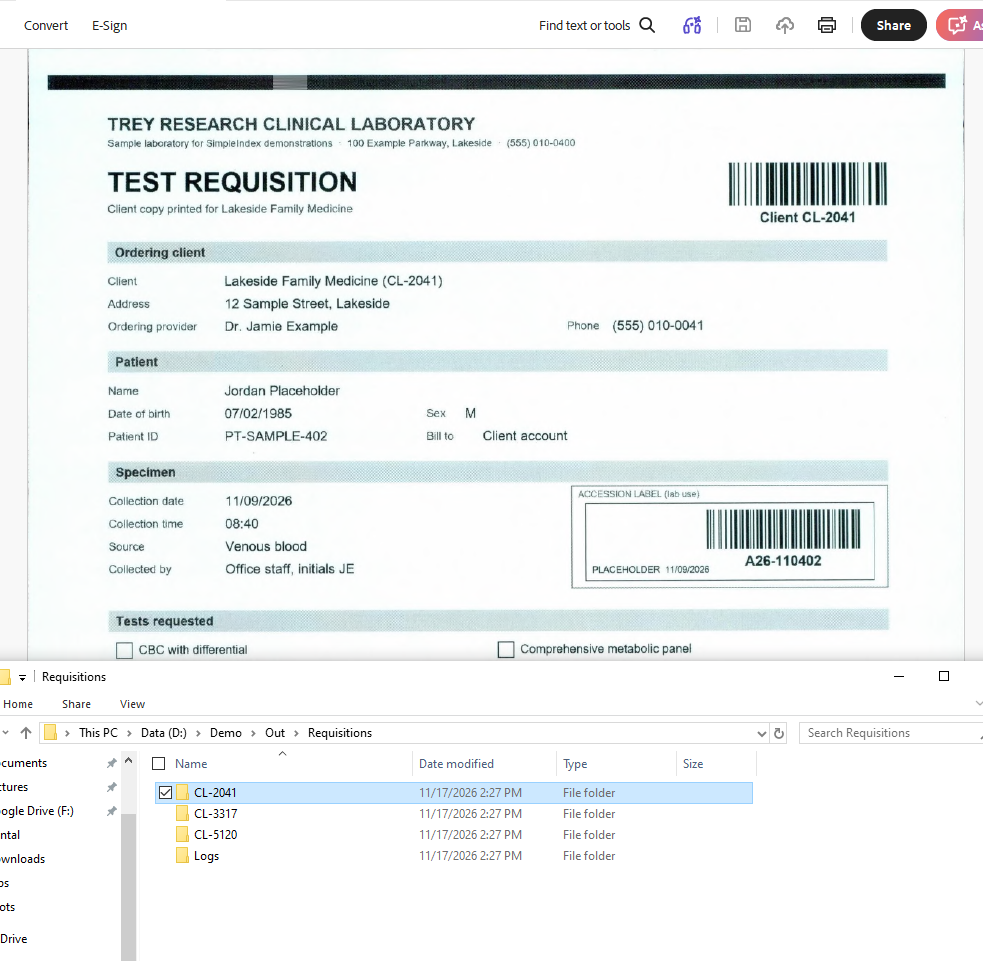
The index log lists every accession number with its client, collection date and page count, ready to check against the LIS or load into it.
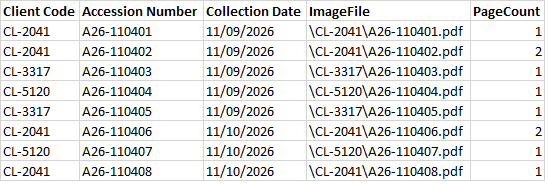
An order continuation has no label of its own, so it takes the client, accession number and collection date of the requisition in front of it and goes into the same file. If a label is missing or can't be read, the page shows on screen with the values it was given, so check the page count in the log before filing.
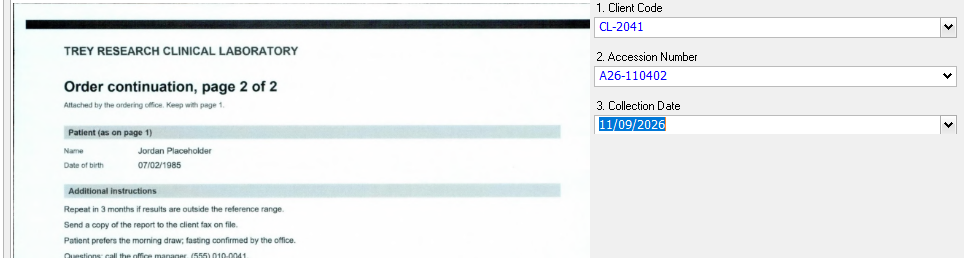
Sample requisitions made for SimpleIndex demonstrations. Trey Research Clinical Laboratory, its clients, patients and every number are made up.
A water sampler ticks the sample type and signs the record over; the lab ticks whether it arrived on ice and signs for it. SimpleIndex files each record by its sample ID in a folder per water system, and logs every tick and signature. Our test: 8 drinking-water records filled in by hand, three with a planned problem: two sample types ticked, no lab signature, and the on-ice boxes left empty. Every record was filed under its sample ID, and all 32 ticks and signatures were read right, the three problems included. The log lists them as Multiple, Missing and No answer for someone to follow up.
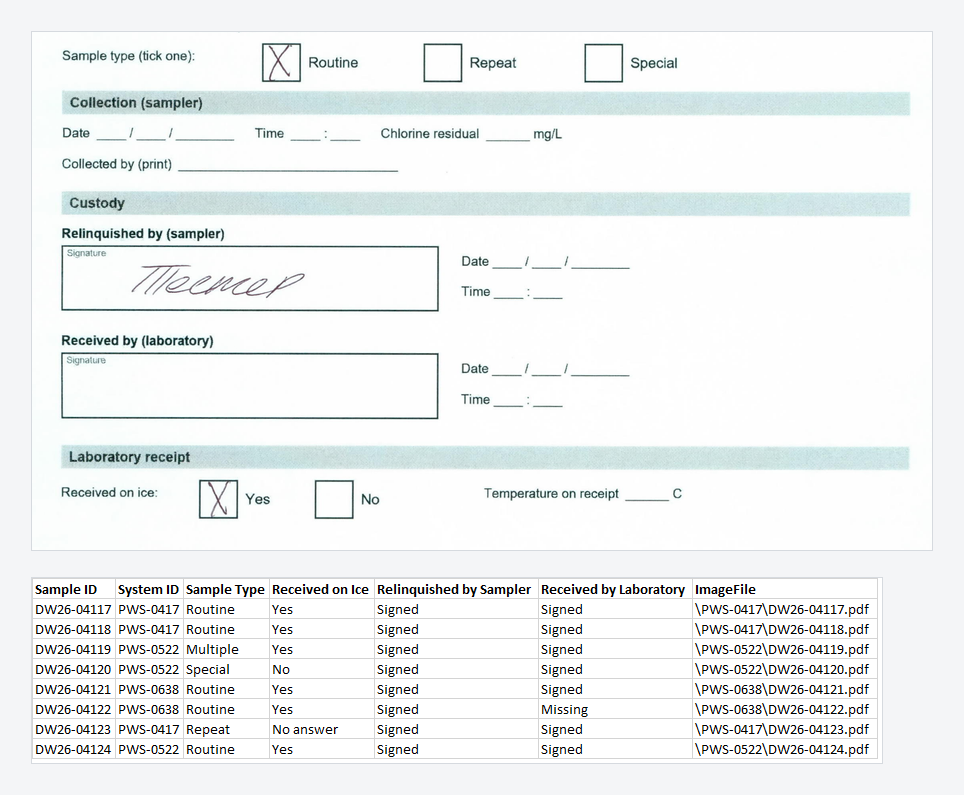
Print the forms at actual size. When a printer shrinks a form to fit the page, the tick boxes move, and the job is set up again to match. Sample records made for SimpleIndex demonstrations. Proseware Environmental Laboratory, the water systems, people and every number are made up.
Your quality manager and your accreditation body decide what to keep and for how long. These are the federal rules that come up most around requisitions, reports and custody records; state rules and accreditation standards can ask for more.
Public health labs, environmental and water testing labs, and pathology and diagnostic groups use SimpleIndex to file requisitions, reports and records by barcode, often in large unattended batches. Some laboratory information system vendors supply it with their own systems. The same team in Knoxville sets up the jobs and trains your staff.
Lab Procurement Services (LPS), also in Knoxville, handles sourcing, ordering and supply for laboratories: one order and one invoice across many vendors, member pricing, and procure-to-pay automation for small and mid-sized labs. LPS and SimpleSoftware have worked together for years.
One example of that work: LPS buys tax-exempt for labs in many places, and every state wants its own exemption form for every vendor. For LPS we built a SimpleIndex set-up that fills in each state's form with LPS's details and the vendor's, puts them into one packet per vendor and sends it. It covers the states LPS buys in; other states and local forms are added the same way.
The same work suits any business that buys tax-exempt in several states: see sales tax exemption certificates.

SimpleIndex is installed on your own workstations and servers. Pages aren't sent to an outside service unless you choose a cloud engine for a job; cloud engines are billed per page by their provider.
SimpleIndex Professional is $1,800 per workstation, including the first year of support, then $300 a year. Standard is $600, then $100 a year, for filing by barcode. Checking tick boxes and signatures, as on the chain-of-custody records, needs the FineReader engine in Professional. The server processing add-on, which runs large batches unattended, is $600. Purchase orders accepted.
Ten sample pages: requisitions, chain-of-custody records, instrument printouts or reports. Black out patient names first, or fill a few blank forms with made-up details.
We build a job for them and show you the result on a 20-minute call.
We ask what you are processing because the answer changes what we would show you.
It doesn't replace it. It names files by the accession number or sample ID your system uses and puts them where the system picks them up: a folder, a database, or a lookup against the system's own tables.
No, unless you choose a cloud engine. SimpleOCR, Tesseract and ABBYY FineReader run on your own computer.
Code 128, Code 39, DataMatrix and QR codes, among others. One page can carry several, such as the accession label and the client's account barcode, each going to its own field.
Hand print in boxes, yes, then checked on screen; see the measured figures on forms processing. Joined-up writing is not read reliably by any method.
No. SimpleIndex reads scanned sheets and files, not tubes. Read the tube at the bench, and let SimpleIndex file the paper.
No. The server processing add-on runs batches from a watched folder unattended; only pages it can't read wait for a person.
The page shows on screen for a person to type the number. In an unattended batch it is filed with the requisition in front of it, so the index log's page counts are worth a glance.
Professional, if you check tick boxes and signatures, read handwritten forms or use AI engines: those need FineReader. Standard covers filing by barcode, such as the requisitions above. Ask us with your samples.
The free trial runs the full software on your own files, and our team in Knoxville can help you set up the first job.