

Save files to the job's input folder from a desktop, a network scanner or a copier, and the service picks them up at its next check, every 5 minutes by default. Several jobs can run at once. The people sending files don't need SimpleIndex installed.
Batch OCR software: thousands of pages in, searchable, named files out
Batch OCR, also called bulk OCR, is for when the job is a box of paper, a production scanner running all morning, or a folder that fills up overnight. SimpleIndex scans or imports the whole batch, splits it into documents, makes every page a searchable PDF, and names and files each document by what it reads. It runs on your own Windows machine or server, so nothing is uploaded, and the license has no per-page fee.
How a batch runs
Bring the batch in
Scan a stack on a TWAIN scanner, or on an ISIS production scanner with Professional or the ISIS add-on for Standard. Or point the job at a folder of PDFs and images, subfolders included, such as a cloud folder that syncs to Windows.

Split it into documents
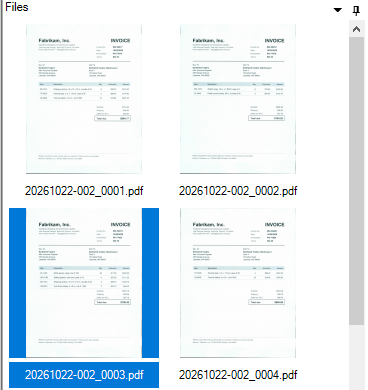
A barcode or coversheet, a blank page, a set page count, or a value read off the first page starts the next document, so one scan of a mixed stack becomes the right number of files.

OCR every page
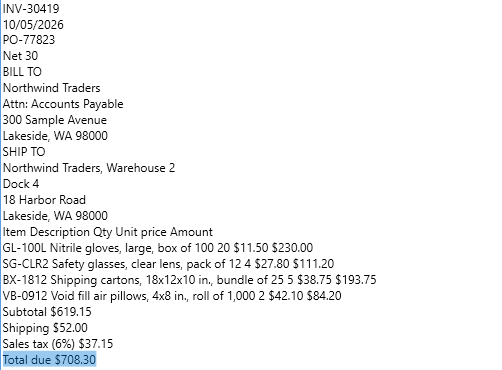
Full-page OCR writes a hidden text layer into each PDF, so it is searchable wherever you store it. The same pass reads index values by zone or barcode, and in Professional by pattern or question.

Name and file each document
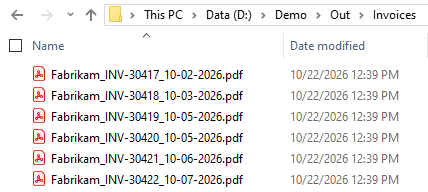
File and folder names are built from the values read. Documents go into the folders you already use or your database, or, in Professional, to SharePoint and email.

01
Run it with nobody there
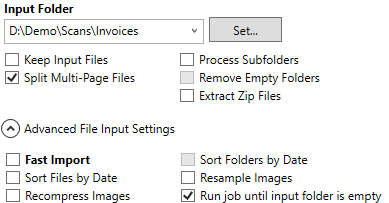
Without Server, a person starts each batch, and a job can keep running until its input folder is empty. The Server add-on runs SimpleIndex as a Windows service that checks each job's input folder on a schedule and processes what it finds, with no one logged in. It attaches to Standard or Professional and is licensed in blocks of a million pages a year.
Nobody has to be logged in, dialog boxes are suppressed, errors go to the Windows Application Log, and the service can be started and stopped remotely.
Start the job once and it keeps processing until the input folder is empty, so a big import finishes without anyone pressing Run again.
Open a job from your own software with one command, pass it index values, and run a program before or after each batch. Running hidden, with no one at the screen, needs Server.
When values need a person to check them, the server's output goes to a validation queue, where Standard users review the documents and fill in what's missing.
02
What happens to every page
Turn on what the job needs. Everything below runs in the same pass, on every page in the batch.
A new document starts at a barcode or SimpleCoversheet separator, a blank page, a set page count, a felt-pen mark on the first page, or the first page an OCR field reads. Or skip separators and let a new index value start the next file.
Each PDF keeps the scanned image and gains a hidden text layer, so Windows Search, SharePoint or any document system can find it. Pages that already carry text are not OCR'd again. PDF/A for archives, and MRC compression with FineReader for smaller color files. Which engine to use is on the OCR software page.
Tick Folder or Filename on any index field and its value becomes a subfolder or part of the name, such as Account\Invoice-Vendor.pdf. Existing files can be appended to, replaced, or kept with a numbered copy.
Deskew, despeckle, black border removal, blank page deletion and front or back page rotation run on every page before OCR and barcodes are read. Auto-rotate uses FineReader.
TWAIN on almost any scanner. ISIS for production scanners at their rated speed, with the scanner settings saved in the job file. Folder import takes PDF, TIFF, JPEG and other images, Office files and zip archives, one batch per subfolder.
Read barcodes to separate and index in one step, with the DTK and Atalasoft engines in both editions and ClearImage as an add-on.
03
Keep the scanner running
A production scanner is only fast while it isn't waiting. Barcode reading and image clean-up can run while pages are still scanning. OCR, database exports and calculated fields stop the scanner between batches, so high-volume sites scan with one job and run OCR with a second, often on the Server.
Desktop use has no page limit, however many operators run however many batches. Only the Server add-on is licensed by volume. High-volume scanning setup →
Before you run a batch
Do I pay per page?
Not on the desktop. The license is paid once and the local engines run on your own machine. The Server add-on is licensed in blocks of a million pages a year, and cloud engines such as AWS Textract are billed per page by the provider.
What's the difference between batch scanning and batch OCR?
Batch scanning gets a stack into files. Batch OCR makes those files searchable and reads values off them. SimpleIndex does both in one job.
Can it OCR files we've already scanned?
Yes. Point the job at the folder, and PDFs and images are processed the same way as a fresh scan, subfolders included. Originals can be kept in place while you test the job.
Do I need the Server add-on?
Only if jobs should run with nobody there. Without it, a person starts each batch, though a job can keep running until its input folder is empty. Server runs jobs as a Windows service on a watched folder, with no one logged in.
How do I separate documents without separator sheets?
If the first page carries a unique value, such as an invoice or account number, each new value starts a new file. Otherwise a blank page, a set page count, or a pen mark on the first page can mark where each document starts.
Will it keep up with a production scanner?
Yes, if the scanning job is kept light. Barcodes and clean-up run during scanning. OCR, exports and calculated fields are better left to a second job, which the Server can run in the background.
Try it on a batch of your own
The free trial runs the full software on your documents, and our team in Knoxville can help you set up the first job.
