
Customer certificates read
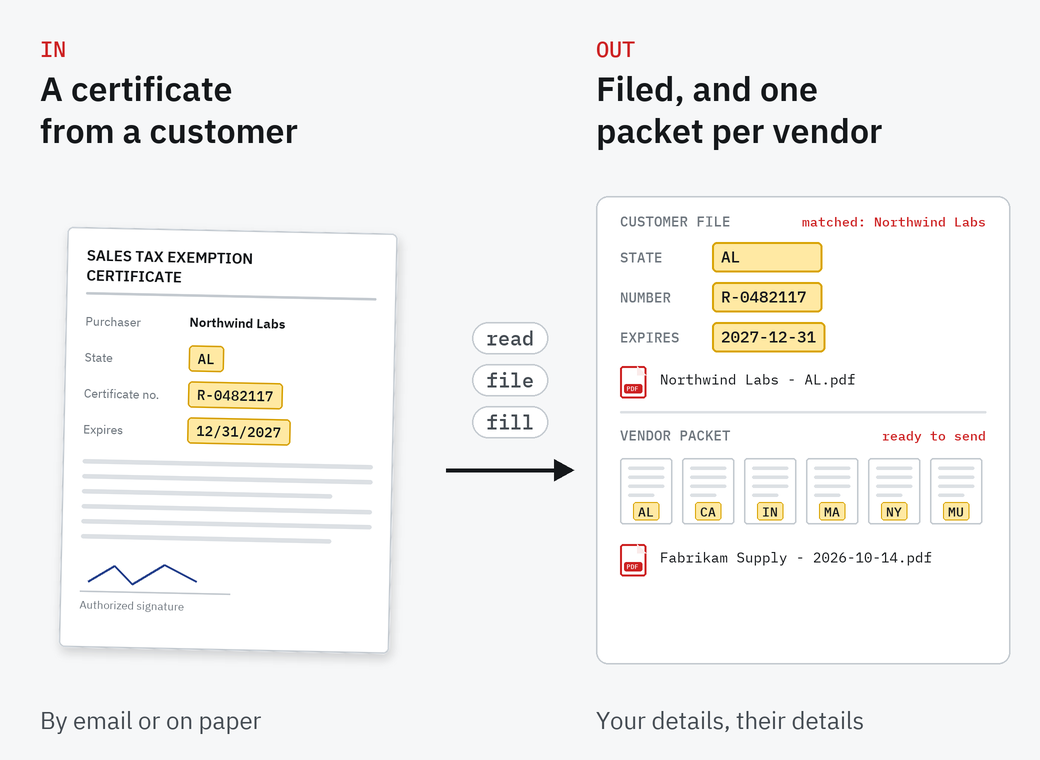
OCR finds the state, certificate number and expiration date on each certificate, and the customer is matched against your customer list. Anything it can't read, you check on screen.
A free SimpleIndex configuration handles both directions. Certificates your customers send by email or on paper are read, matched to the customer and filed with their state, certificate number and expiration date. And when you buy tax-exempt, your own certificates are filled in for each vendor and combined into one PDF, ready to send.
Two sets of SimpleIndex jobs: one for the certificates you receive, one for the ones you send.
OCR finds the state, certificate number and expiration date on each certificate, and the customer is matched against your customer list. Anything it can't read, you check on screen.
Each certificate is saved as a PDF named by customer and state, with its details in a database. A search job finds any certificate by customer, state or number.
Every certificate's expiration date is stored with it, so the ones about to lapse can be listed before an audit finds them.
Certificates mostly arrive as email attachments. SimpleIndex 12 Professional can collect them from the mailbox directly instead of someone saving each one.
Your company details are filled into each state's fillable form once. Then pick a vendor, and its name and address are filled in from your vendor list.
The filled forms are combined into one PDF per vendor, ready to email. The download includes forms for Alabama, California, Indiana, Massachusetts and New York and the multistate certificate; any state's fillable form can be added.
The jobs, the databases, the state forms and step-by-step instructions.
Your customers and your vendors, from a spreadsheet or your own database.
Run the certificate job on what customers have sent.
Choose a vendor and get one PDF with every certificate filled in.
Lab Procurement Services (LPS), a Knoxville procurement partner for laboratories, uses the vendor side of this configuration to fill its exemption certificates for its suppliers and send them out, instead of preparing each state's form by hand.
Every business buys and sells in a different set of states, so the download is a starting point rather than a finished product. Our team in Knoxville can add the state forms you need, connect your customer and vendor data, and set SimpleIndex 12 up to email the packets to your vendors.
It handles the certificates themselves. Working out tax rates and filing returns is a job for your tax software.
Forms for Alabama, California, Indiana, Massachusetts and New York, and the multistate certificate that many states accept. Any state's fillable PDF form can be added to the set.
The download leaves each vendor's packet ready to email. SimpleIndex 12 can also send the packets by email as part of the job, which our team can set up for you.
Expiration dates are stored with every certificate, so you can list the ones about to lapse. It does not send reminders on its own.
SimpleIndex Professional, which fills PDF forms and reads email.
Yes. Download it and run it in the SimpleIndex trial on your own certificates.
No. It files and fills the exemption certificates. Tax rates and returns stay with your tax software.
The SimpleIndex trial runs the free sales tax configuration, and our team in Knoxville can adapt it to your states and vendors.
