
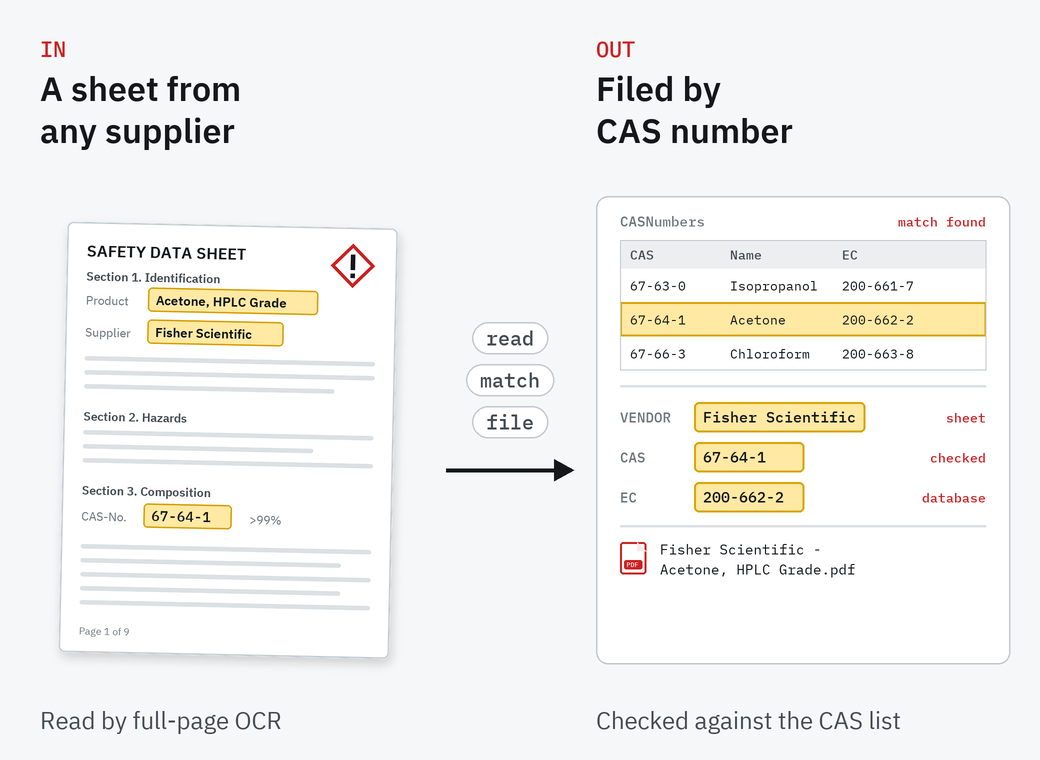
Full-page OCR finds the CAS numbers on the sheet, and each one is checked against the CAS database, so a misread number doesn't become a wrong record.
Safety data sheets, indexed by CAS number
Scan your SDS binders or point SimpleIndex at a folder of safety data sheet PDFs. It reads each sheet, finds the CAS numbers, checks them against a CAS database that comes with the free starter job, and files each sheet by vendor and product into a searchable archive, so any chemical can be found by name, CAS or EC number.
01
What the starter job does
A ready-made SimpleIndex job and CAS database, set up for safety data sheets.
Vendor and product name
A dictionary of chemical manufacturers picks out the vendor, and the product name is read from the sheet.
The rest filled in for you
Description, EC number and registration date come from the CAS match, not from typing.
A searchable archive
Each sheet is saved as a searchable PDF named by vendor and product, and its fields, full text and file path go into a database. A search job for that archive comes with it.
Scan the binders, or let the job pick up the PDFs you already downloaded from suppliers, a folder at a time.
The job runs in every edition. Professional's FineReader and AI engines read the sheets with unusual layouts more reliably.
From binder to archive in four steps
Download the starter job
The job, the CAS database, a search job and sample sheets, in one zip.
Point it at your sheets
Your scanner, or the folder of SDS PDFs.
Check the matches
Review the vendor, product and CAS values before they are saved.
Search the archive
Find any sheet by chemical name, CAS number or EC number.
03
What is in the download
The SDS indexing job, a CAS number database in Access format, a job for searching the archive, and 22 sample sheets from suppliers such as Sigma-Aldrich, Fisher Scientific and Honeywell to try it on. It runs in SimpleIndex 12.
It is a starting point. Our team in Knoxville can adapt it to your own sheets, add fields, or point it at your chemical inventory database instead. Watch the SDS demo.
Before you index the first binder
SDS or MSDS?
The same documents. Material safety data sheets (MSDS) became safety data sheets (SDS) when OSHA adopted the GHS format in 2012. The job handles both.
Does it work with the 16-section GHS format?
Yes. CAS numbers are found anywhere on the page with full-page OCR, so the section layout doesn't matter. In a GHS sheet they sit in section 3.
Can I use my own chemical inventory database?
Yes. The CAS lookup can point at your own database through ODBC, so sheets are matched to the chemicals you actually stock.
Which edition do I need?
The starter job runs in every edition. Professional adds FineReader and AI engines, which read unusual layouts more reliably.
Is the starter job free?
Yes. Download it, run it in the SimpleIndex trial on your own sheets, and buy SimpleIndex when it works for you.
Try it on your own sheets
The SimpleIndex trial runs the free SDS starter job on your own safety data sheets, and our team in Knoxville can help you adapt it.