
SimpleIndex 11.4 Release Notes
SimpleIndex 11.4 new version, adds major new features like an easy option to customize what emails need to be processed from email boxes by setting dates and subfolders and automatically updating them each time these emails are processed. Additionally, ChatGPT integration was added. This allows you to extract index values and text from any document and use them to create an AI prompt.
New Features
 Adds option to process all emails received after a certain date and time, and makes it so the date and time can automatically update each time you run it so you can incrementally process emails regardless of unread status.
- Automatically convert Email text attachments to PDF files.
- Analyze Document API for Tables extracts tabular or table data organized in columns and rows.
- Turns off output full page OCR files when PDF is selected, turns it back on when you switch to txt or something else.
- Adds Hotkey for the Split File function.
- ChatGPT integration puts powerful AI document analysis functions into a custom Autofill lookup. This allows you to extract index values and text from any document and use them to create an AI prompt. The answer provided by ChatGPT can then be saved as an index field value or parsed into multiple values. Currently, ChatGPT 3.5 Turbo is the only AI model available. Other models can be enabled by request. Please Contact Us to request additional models and other features.
- Allows Finereader Fulltext and AWS Forms to work at the same time. Why to limit yourself to one OCR engine? Now, you can use both!
-
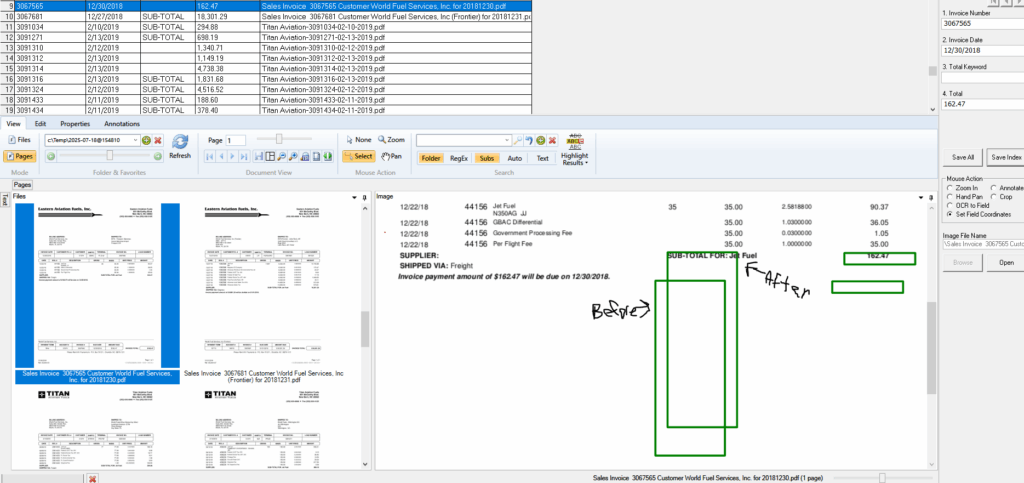
Automatically adjust OCR zones based on static elements on the page. Allows you to create a “static text” region with a known text string and coordinates and then to adjust all zones by the offset of the static text. That makes it easier to process large amounts of scanned documents of the same structure with several zones that often move around. For example, invoices with several variable line items and the invoice number, total amount and signature at the end. The location of the total amount and invoice number will be moving depending on the amount of line items, and now you can create specific zones that will be automatically adjusted to read them. Here is an example.

 Adds option to process all emails received after a certain date and time, and makes it so the date and time can automatically update each time you run it so you can incrementally process emails regardless of unread status.

Bug Fixes and Minor Changes
- No Output When Table Field is Blank.
- Attachments with same filename don’t import.
- Insert scan/file in batch overwrites existing pages.
- Support multiple email addresses in TO, CC fields.
- OCRProcess Execution Error with AWSText and AWSInvoice.
- Not showing annotation overlays when imported into SimpleIndex and viewing with SimpleView.
- Right-click and Edit on a job file opens it in SimpleIndex without running, on a clean installation.
- Not Splitting of PDF File.
- PDF Merge/Bookmark Errors When File in Use.
- Remove Empty Sub-Folders Unchecked.
- “Forward this field value to next batch” Not Saving on Last Index Field.
- Forward All Values to Next Batch (OCRing Blank Issue).
- Post-Process Running Job Twice.
- Getting Error When Appending to File In Second Output Folder.
- Edge cannot write to data directory error when run as admin.
- When using Autonumber separation that increments on “OCR Field Found” it isn’t incrementing the Autonumber up one when the value in the field is changed.
- Processing PDF with Digital Signatures causes it is export the page out of order.
- Does not report coordinates in OMR zone dialog.
- ISIS Scanning Not Working for Kodak i4650.
- If you have an OMR zone on the page already it doesn’t save the zone after editing.
- Job Configuration Password Not Working.
- Slower barcodes when engine set to Pegasus.
- When you change the font size it doesn’t actually change it with the new imprinting.
- Update Mode Not Updating ImagePath Field.
- First Barcode Not Reading after Fresh Open.
- Atalasoft Engine Freezing During Processing.
- Changed language of Image Enhancement wizard page Added “Use only if needed” warning for image enhancement.
- Changed language of PDF Processing wizard page Added “Use only if needed” warning and more detailed description.
- Autofill function was modified to allow using SharePoint document libraries as the data source to query metadata fields and return the matching data.
- The Autofill Match field settings is always enabled whenever a data source is set, regardless of whether the table fields can be pulled from the database.
- Multiple UCC128 ClearImage options do work as intended now.