
SIGN IN YOUR ACCOUNT TO HAVE ACCESS TO DIFFERENT FEATURES

Login with Google
FORGOT YOUR PASSWORD?

FORGOT YOUR DETAILS?

AAH, WAIT, I REMEMBER NOW!
QUESTIONS? CALL: 865-637-8986
  • LOGIN

SimpleIndex

  • LEARN MORE
    • GENERAL INFO
      • Getting Started
      • How To Scan Documents
      • Barcode Scanning Guide
      • Searching & Viewing
      • Sunshine Software
      • News & Updates
      • Schedule a Consultation
    • FEATURES
      • Streamlined Interface
      • Automated & 1-Click Processing
      • TWAIN and ISIS Scanning
      • Zone OCR and Dynamic OCR
      • Handwriting Recognition Software
      • Amazon Textract OCR and ICR
      • Screenshot OCR
      • Document Classification
      • Database Integration
    • –
      • PDF & MS Office Text Parsing
      • Email Document Processing
      • Barcode Recognition
      • Optical Mark Recognition
      • Match Documents to Existing Data
      • Required Documents Check
      • Imprinting & Watermarking
      • SharePoint Document Scanning
      • AI and SimpleIndex
  • SOLUTIONS
    • General
      • All-In-One Scanning & Sorting Tool
      • Affordable Document Management
      • Instant Integration
      • Network Scanners & Copiers
      • Remote Document Capture
      • Reduce Click Charges for Data Capture
      • Compare with Other Solutions
    • Feature Demos
      • Zone OCR with Template Matching
      • PDF Text Processing
      • Organize Office Documents
      • Automatic Image Splitting
      • Amazon Textract OCR and ICR
      • Full-Page OCR & Multi-User Workflow
      • PDF Form Filling with XML & RPA
      • AP to QuickBooks Online with RPA
      • CRM Integration with RPA
    • Marketplace
      • Sales Tax Exemption Forms OCR
      • Invoice Processing
      • Automatic Web Image Optimization
      • Material Safety Data Sheets (MSDS) Indexing
      • Patent ID and Title Extraction OCR
      • Federal Tax Returns
      • Mortgage & Loan Documents
      • Canvassing and Political Surveys Processing
  • SUITE
    • SimpleCoversheet – Print Bar Codes
    • SimpleExport – Data File Converter
    • SimpleView – Search, View & Edit
    • SimpleQB – QuickBooks Integrator
    • SimpleOCR – Freeware OCR
    • Buy Suite Apps
  • DOWNLOAD
  • SHOP
    • COMPARE VERSIONS
    • SIMPLEINDEX
      • Workstation License
      • Concurrent License
      • Subscription License
    • SIMPLEINDEX SERVER
    • SOLUTIONS
      • LoanStacker
      • Material Safety Data Sheets (MSDS) Indexing OCR
      • Patent ID and Title Extraction OCR
      • Sales Tax Exemption Forms OCR
      • SimpleInvoice
      • TaxStacker Add-on for SimpleIndex
    • ADDONS AND EXPANSIONS
    • MAINTENANCE & CONSULTING
    • MANAGE SUBSCRIPTIONS
    • FIND A DEALER
      • Dealer Locator
      • Become a Dealer
    • CONTACT SALES
  • SUPPORT
    • WIKI HELP
    • KNOWLEDGE BASE
    • SIMPLEINDEX UNIVERSITY
    • PRIVACY POLICY
    • CONTACT SUPPORT
    • SimpleIndex Privacy Policy
    • NEWSLETTER
    • SCHEDULE A CONSULTATION
  • My Account
    • Register Account
    • MANAGE SUBSCRIPTIONS
    • Downloads
    • Login
  • MY CART
    No products in cart.
  • Home
  • News & Updates
  • Newsletter
  • Health Claims OCR Tips – Elevating Your Health Claims Processing

Health Claims OCR Tips – Elevating Your Health Claims Processing

by Simple Software / Thursday, 02 July 2026 / Published in Newsletter

Health Claims OCR: Mastering Complex Medical & Dental Forms Processing

Managing healthcare claims can feel like a constant battle against complex layouts, low-quality scans, and strict data validation requirements. Manual data entry is a massive bottleneck that delays reimbursement, ties up billing staff, and increases costly filing errors.

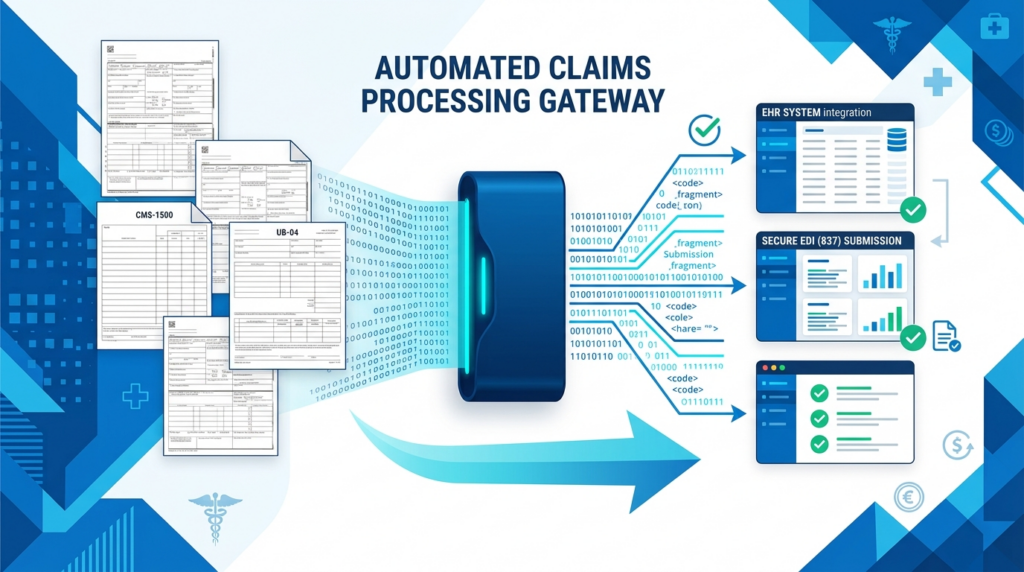
This month, we are focusing on how to break through the paperwork backlog using automated document processing systems. By combining enterprise grade recognition tools with automated data validation, you can transform messy health insurance documents into clean, structured data ready for your billing, clearinghouse, or EHR system. Moving from manual typing to automated capture slashes processing times from minutes per form to seconds, ensuring cleaner submissions, fewer rejections, and a faster revenue cycle.

Health Claims OCR NewsLetter

Medical Forms

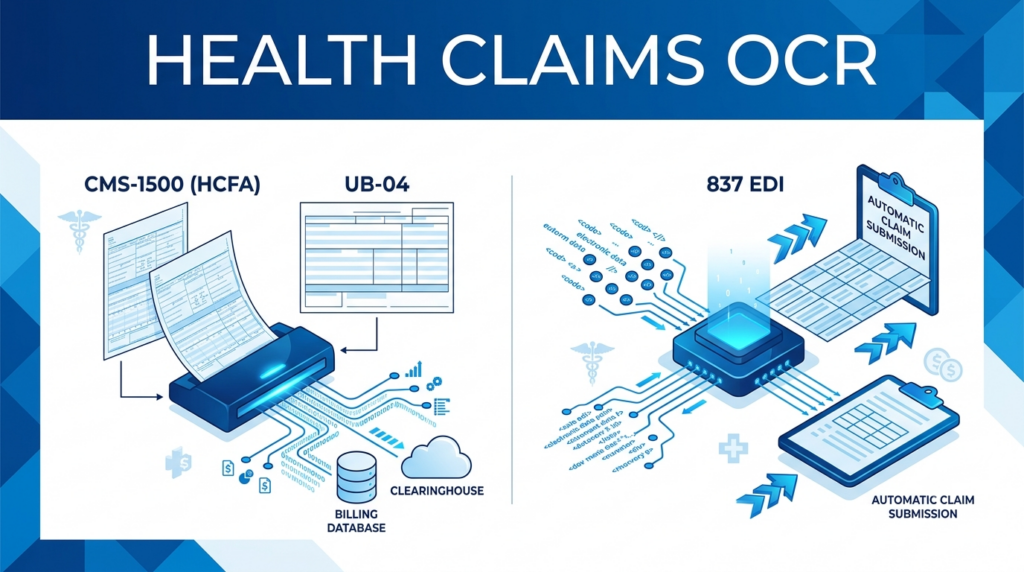
At our dedicated medical forms site, healthclaimsocr.com, we focus on tailoring enterprise extraction strategies, powered by advanced engines like ABBYY FlexiCapture, to handle the unique layout and compliance challenges of the specific forms flooding your workflow.

  • CMS-1500 (HCFA) Forms: Used for professional outpatient services, these documents require precise field alignment. Because the forms frequently shift by a few millimeters during printing or faxing, standard fixed-zone OCR can easily miss the target. Employing FlexiCapture’s advanced layout matching and dynamic anchor points allows the system to lock onto the form’s headers, automatically aligning the image so provider details and patient information match perfectly every time.

  • UB-04 (CMS-1450) Institutional Bills: Used by hospitals and inpatient facilities, UB-04 forms are dense and complex, often featuring extensive line-item grids for accommodation and ancillary charges. Advanced health claims processing ensures that multi-page institutional bills are correctly grouped, and complex line items are extracted cleanly without row data bleeding together.

  • J430 (ADA Dental Claim) Forms: Standardized for dental treatments, J430 forms contain highly specific grids for oral cavity areas, tooth systems, and specialized tooth codes. Utilizing intelligent recognition ensures that precise procedural data, provider NPIs, and tooth-by-tooth descriptions are meticulously parsed and cross-referenced against dental billing dictionaries.

  • 837 EDI Transactions: When managing high-volume claims, paper or PDF documents often need to be ingested and converted directly into compliant, electronic EDI 837 files (Professional, Institutional, or Dental). Advanced extraction workflows format and map your data automatically to meet the rigid requirements mandated by the HIPAA Transactions and Code Set Rule, paving the way for seamless electronic submission.
Health Claims OCR NewsLetter

Explore Specialized Medical Capture:

Explore Specialized Medical Capture Solutions: Ready to configure an elite data capture pipeline? Our team specializes in designing, deploying, and optimizing custom enterprise jobs using ABBYY FlexiCapture to handle your highest-volume claims. Visit our specialized platform at healthclaimsocr.com to request a consultation, explore pre-configured templates, and discover how to fully automate your health insurance claims.


Contact your SimpleIndex representative today to set up your Medical Forms processing solutions.

  • Tweet
Tagged under: Automatic Indexing Software, Fill PDF Forms, multiple zones, OCR, OCR Form Processing, PDF Form Filler, PDF Forms, Read PDF Forms, Recognize Cursive Handwriting, Zone OCR

Search

Connect with Us!


What is 7+4?


Search Knowledge Base

Recent KB Articles

  • Silent Installation Instructions
  • How much do Simple Software products cost?
  • The 'Microsoft.ACE.OLEDB.12.0' provider is not registered on the local machine.
  • Enable License Log
  • Change License Files Path
  • License Activation Instructions for Simple Software Products
  • What are SimpleIndex Specifications?
  • On what versions of Windows does SimpleIndex run?

Feature Cloud

Barcode OCR accessability Aztec and QR Code</li> <li>Recognize 30 different 1D barcode formatsCode 39 Bar Code Printing Bar Code Scanning Automatic PDF Separation 1-Click Processing Batch Scanning Automatic Indexing Software Barcode Printing a generic barcode coversheet can be used to separate the scanned images into multi-page files Barcode Recognition Software Bates Numbering Software Automatic Data Capture Checkbox Recognition Business Process Automation 2 of 5 Archive Email to PDF Bar Codes Barcode Reading Software

Online Support Options

Check our Wiki Help, Knowledge Base and Training Videos, or Contact Support if you still need Help

How to Buy

Solutions start at just $500! Buy SimpleIndex online or from an Authorized Dealer in your area.

Authorized Dealers

Authorized DealersSimpleIndex is a great addition to any system integrator's product line. Become an Authorized Dealer.

Get a Web Demo

Get a free online demo with a scanning specialist who can configure SimpleIndex on your computer remotely.
Sign up for a demo now!

Download a Trial

SimpleIndex Trial30-day trial downloads are available for all Simple Software applications.
Download Now!

SimpleIndex Applications

SimpleIndex Applications Packaged apps built with SimpleIndex.
SimpleInvoice for AP
Sales Tax Manager
Mortgage LoanStacker
MSDS and Patents
SimpleIndex

© 2026 Meta Enterprises, LLC | Knoxville, Tennessee | A Family Owned Company
© 2026 SimpleSoftware | Consulting Services in the Field of Software as a Service

TOP
SimpleIndex
Manage Cookie Consent
We use cookies to optimize our website and our service.
Functional cookies Always active
The technical storage or access is strictly necessary for the legitimate purpose of enabling the use of a specific service explicitly requested by the subscriber or user, or for the sole purpose of carrying out the transmission of a communication over an electronic communications network.
Preferences
The technical storage or access is necessary for the legitimate purpose of storing preferences that are not requested by the subscriber or user.
Statistics
The technical storage or access that is used exclusively for statistical purposes. The technical storage or access that is used exclusively for anonymous statistical purposes. Without a subpoena, voluntary compliance on the part of your Internet Service Provider, or additional records from a third party, information stored or retrieved for this purpose alone cannot usually be used to identify you.
Marketing
The technical storage or access is required to create user profiles to send advertising, or to track the user on a website or across several websites for similar marketing purposes.
  • Manage options
  • Manage services
  • Manage {vendor_count} vendors
  • Read more about these purposes
View preferences
  • {title}
  • {title}
  • {title}
});