
SimpleIndex – Harvest Scale Tickets, One per File
One File per Scale Ticket, Checked Against the Register
Harvest edition: scale tickets for grain elevators, co-ops and growers
Harvest is in, and every load that crossed the scale left a ticket behind. The scale software has the numbers, but growers, settlement clerks and crop insurers still ask for the paper. Crop insurers want each ticket, not a summary, and keep asking for up to three years after the crop year.
The same approach works for other numbered paper, such as invoices, checks and delivery receipts: one file per document, named by its number, then checked against the list of what should have arrived. Here it is with a sample grain elevator from our new food and agriculture page.
Two days of scale tickets, one file per load
Our sample elevator, Woodgrove Grain Cooperative, took in 14 loads of corn and soybeans from three growers over two days, and 13 of the tickets reached the office. We printed them, scanned them as one stack and ran them through SimpleIndex 12.
- SimpleIndex reads the ticket number from the barcode the scale software prints.
- It reads the grower, commodity, date, net weight, moisture, dry bushels and disposition from the page.
- It files each ticket as its own searchable PDF in the grower’s folder, for example G-1042\Corn_104511.pdf.
- It writes every value to the index log, one row per ticket.
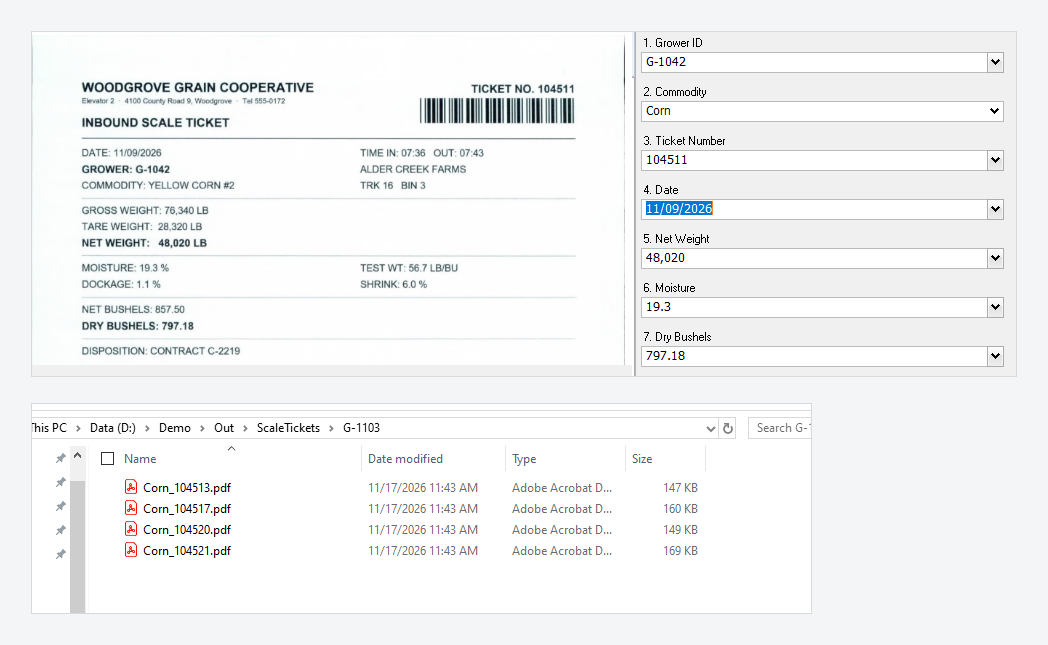
Every value it read was right on all 13 tickets.
The check that caught a typing slip
One ticket had a spill across its moisture and bushel lines, so SimpleIndex stopped on it for the clerk to type the values. Then we opened the index log in Excel next to the scale register, the list the scale software keeps. It showed two things a settlement clerk wants to see before paying anyone:
- A ticket that never reached the office: ticket 104518 was in the register but not in the stack.
- A typing slip: the typed dry bushels were 814.8, where the register says 814.18.
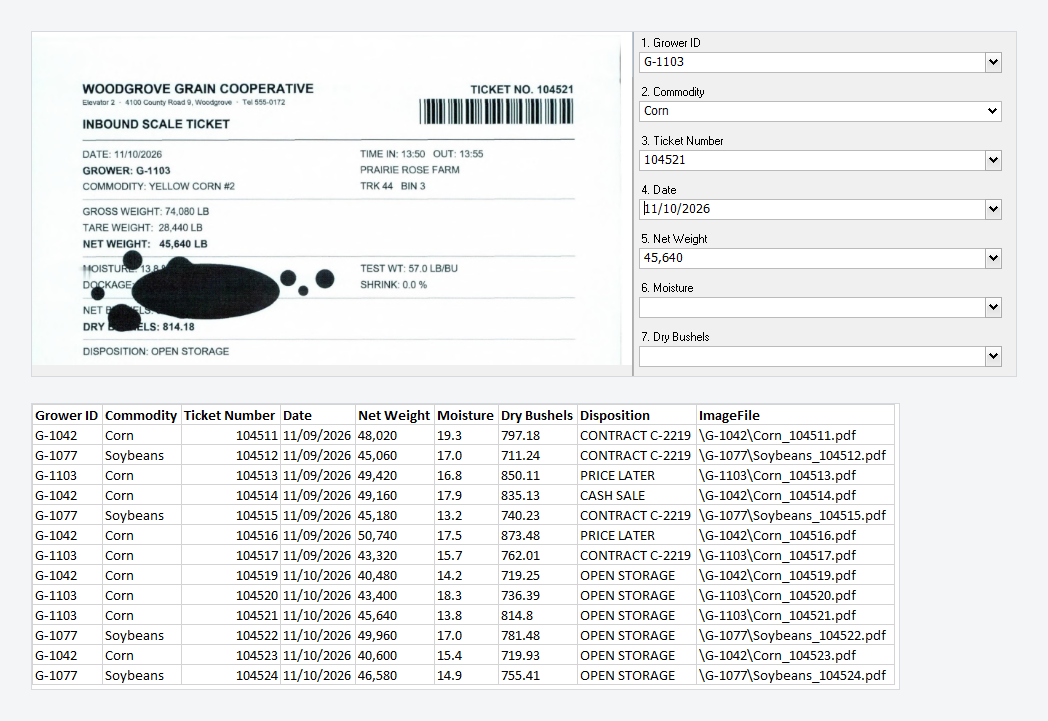
We didn’t plan the second one. It happened while we were typing, which is exactly why the check is worth doing.
What we learned setting up the job
- File by the barcode: if your scale software prints the ticket number as a barcode, use it. It is the most reliable value on the page, and barcode reading works in SimpleIndex Standard.
- Don’t rely only on the label: OCR doesn’t always keep the reading order you’d expect, so instead of “the number right after Dry Bushels”, look for the value itself: a number with two decimals, or the only date on the page.
- Make the important fields required: dry bushels was a required field in our job, so the spilled ticket stopped on screen instead of being filed with a blank.
- Watch out for older printers: our first test tickets used a dot-matrix style font, and OCR put spaces inside numbers, like “49 ,960”. We got 97 of 104 values right that way, and 104 of 104 with laser-printed tickets. Allow spaces in your patterns, or send us a few tickets and we’ll tune the job.
- Check typed values too: values a person types are the ones most likely to be wrong. Compare the index log against the system that printed the paper.
Also new on simpleindex.com
The food and agriculture page also covers delivery invoices checked for a signature and lot codes traced for FDA’s food traceability rule. We’ve also added pages for government, laboratories and forms processing, each built on sample documents we printed and scanned ourselves.
Send us ten pages
Have a different ticket format? Send us ten sample pages, with anything confidential blacked out. We’ll build a SimpleIndex job for them and walk you through the result on a 20-minute call: what it read, what needed typing, and how the files are organized.

Send a sample batch to your SimpleIndex representative or download SimpleIndex 12 today.
Happy Thanksgiving from Knoxville!