SIGN IN YOUR ACCOUNT TO HAVE ACCESS TO DIFFERENT FEATURES

Login with Google

CREATE AN ACCOUNT FORGOT YOUR PASSWORD?

FORGOT YOUR DETAILS?

AAH, WAIT, I REMEMBER NOW!

CREATE ACCOUNT

ALREADY HAVE AN ACCOUNT?

Login with Google

QUESTIONS? CALL: 865-637-8986
  • SIGN UP
  • LOGIN

SimpleIndex

  • Solutions
  • Features
  • Pricing
  • Download
  • Docs & Support
  • My Account
  • MY CART
    No products in cart.
Thursday, 08 March 2018 / Published in Release Notes

SimpleIndex v8.0

SimpleIndex v8.0

There are hundreds of changes, both big and small, in the version of SimpleIndex 8.0.

A few of the more notable changes are listed below:

    • New Job Settings Wizard – set all options via the redesigned wizard
    • Integrated SimpleView – wrangle pages inside the SimpleIndex window
      • Search within Batches for text or filenames
      • Hole Punch Removal
      • Rotate 180°
      • Invert Colors

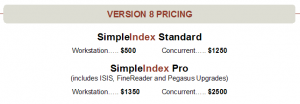
    • New Licensing Model – Workstation or Concurrent
    • New Product Editions – now just two flavors, Standard or Pro
      • Both offer a Full feature set
      • Standard includes Tesseract OCR and DTK Barcode engines
      • Pro adds FineReader OCR and Pegasus Barcode

    • Point-Click OCR – Click text on the page to send it to an index field
      • New Splash Screen – Paperless Owl is extinct (by popular demand)
    • Enhanced OCR Options – match against other indexes, skip OCR on full-text files
    • Support for international character sets using Unicode
  • New SimpleInvoice Preconfigured Solution
  • Tweet

Search

Connect with Us!


What is 7+4?


Search Knowledge Base

Popular KB Articles

  • License Site Update v9.2.50 and Earlier
  • License Activation Instructions for Simple Software Products
  • Language Pack for Standard/Tesseract OCR
  • How to test if TWAIN drivers work properly?
  • The 'Microsoft.ACE.OLEDB.12.0' provider is not registered on the local machine.
  • How much do Simple Software products cost?
  • I finished scanning and found a page that did not get scanned or was scanned incorrectly. How can I correct this?
  • How to test if TWAIN/ISIS drivers work properly?

Feature Cloud

1-Click Processing Amazon Textract AI Document Processing Barcode Recognition Software Automatic PDF Separation Automatic Data Capture Archive & Convert Email to PDF Automatic Indexing Software Batch Scanning ABBYY FineReader AI Document Analysis Bar Codes AI Job Assistant Accounts Payable Automation Azure Document Intelligence Barcode OCR Barcode Reading Software Barcode Printing (Bar Code Printing) Bar Code Scanning 2 of 5
SimpleIndex

On-premise document capture and indexing. Buy it once, run it on your own hardware.

865-637-8986

Newsletter

A few times a year. Unsubscribe any time.

Thanks. Watch for a confirmation email.

Buy

  • Pricing
  • Store
  • Edition and pricing sheet (PDF)
  • Compare all editions
  • Compare with other solutions
  • On-premise vs. cloud costs
  • Video demos
  • Partners and resellers

Features

  • Document capture
  • OCR software (Zone & Dynamic)
  • Batch OCR
  • TWAIN & ISIS scanning
  • PDF & Office text parsing
  • PDF form filling
  • Handwriting & ICR
  • OMR (mark recognition)
  • Forms processing
  • Barcode recognition
  • Database integration
  • Document classification
  • Image clean-up
  • Bates stamping
  • Amazon Textract
  • AI and LLM OCR

Solutions

  • Healthcare
  • Legal
  • Financial services
  • Education
  • Transportation
  • Casinos and gaming
  • Manufacturing and distribution
  • Government and public sector
  • AP automation & QuickBooks
  • SimpleInvoice
  • Local / on-premise AI

Support

  • Getting started
  • How to scan documents
  • Barcode scanning guide
  • Wiki
  • Knowledge base
  • SimpleIndex University
  • Release notes
  • AI Job Assistant
  • Upgrades
  • Check your license
  • Log in
  • Register an account

© 2026 Meta Enterprises, LLC | Knoxville, Tennessee | A Family Owned Company

© 2026 SimpleSoftware | Consulting Services in the Field of Software as a Service

Contact Privacy Policy Cookie preferences
TOP
SimpleIndex
Manage Cookie Consent
We use cookies to optimize our website and our service.
Functional cookies Always active
The technical storage or access is strictly necessary for the legitimate purpose of enabling the use of a specific service explicitly requested by the subscriber or user, or for the sole purpose of carrying out the transmission of a communication over an electronic communications network.
Preferences
The technical storage or access is necessary for the legitimate purpose of storing preferences that are not requested by the subscriber or user.
Statistics
The technical storage or access that is used exclusively for statistical purposes. The technical storage or access that is used exclusively for anonymous statistical purposes. Without a subpoena, voluntary compliance on the part of your Internet Service Provider, or additional records from a third party, information stored or retrieved for this purpose alone cannot usually be used to identify you.
Marketing
The technical storage or access is required to create user profiles to send advertising, or to track the user on a website or across several websites for similar marketing purposes.

  • Manage options
  • Manage services
  • Manage {vendor_count} vendors
  • Read more about these purposes
View preferences
  • {title}
  • {title}
  • {title}