
SimpleIndex Tips & Tricks – File Every Page by the Number on It
File Every Page by the Number on It
Shop floor edition: packing slips, mill certs and travelers
Every business has one number that ties its paper together. In a plant it is the PO number on the packing slip, the heat number on the mill test report and the work order number on the traveler. In an office it is an invoice, claim or case number. Once SimpleIndex finds that number on the page, it names the file, picks the folder and passes the number on to your other systems, without anyone typing it.
Your ERP runs the plant, but the proof still arrives on paper. Someone scans it, names it and files it, or it sits in a drawer until an auditor or a customer asks for it. Here is how SimpleIndex handles that paper, with a sample delivery from our new manufacturing page.
One delivery, start to finish
A truck arrives with a packing slip, mill test reports for two heats and a certificate of conformance. Receiving puts the inspection sheet on top and scans the stack.
- SimpleIndex tells the documents apart by their titles.
- It finds the PO number wherever the supplier printed it.
- It reads the heat number and grade from each mill test report.
- It saves each document as a searchable PDF in the PO’s folder and names each mill cert by its heat, for example Receiving\4500031702\MTR_8M2907.pdf.
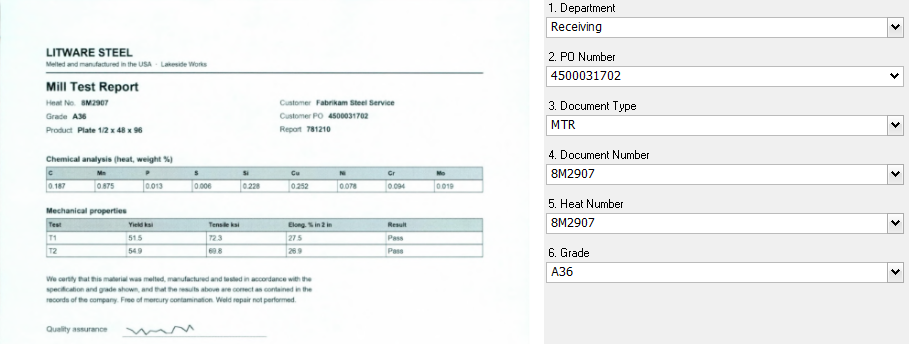
When the shop needs the cert for heat 8M2907, it finds it by typing the heat number. When purchasing opens the PO folder, the whole delivery is there.
Three ways to find the number
- By pattern, anywhere on the page: every supplier prints the PO number somewhere different. A pattern such as “45 followed by eight digits” finds it wherever it is. This is the one to use for documents from many senders: packing slips, vendor invoices, claims.
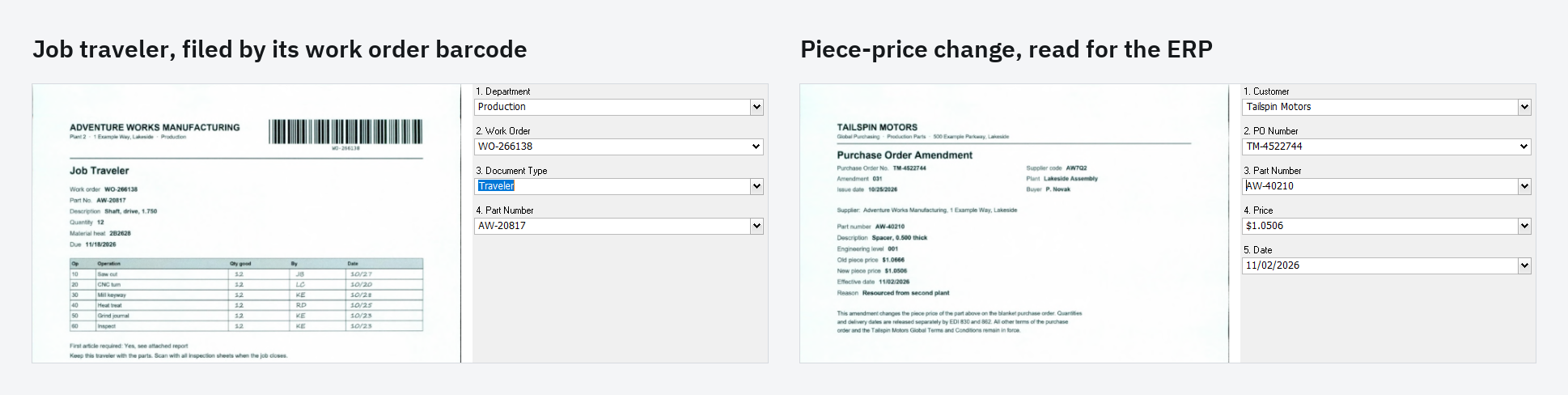
- By zone: when you know the layout, draw a box around the field. Each customer sends POs in its own layout, so each layout gets its own zones for the PO number, part number, price and date.
- By barcode: print the work order number as a barcode on the traveler. SimpleIndex reads it and files the traveler, and every inspection sheet scanned behind it, in that job’s folder. Barcodes are the most reliable of the three, and barcode reading works in SimpleIndex Standard.
Five tips from our own test runs
We printed, scanned and processed sample paperwork for the manufacturing page. These are the things that tripped us up, so they don’t trip you up.
- Write the pattern tightly: “45 followed by exactly eight digits” won’t catch a phone number or a date. “Any number after PO” will. OCR often reads a colon as a full stop, so let the pattern accept either one after a label.
- Check how OCR reads labels set in two columns: when a form prints all the labels in one column and all the values in another, full-page OCR can return every label first and every value after. If a value can’t be found next to its label, use a zone for it.
- Make document-type rules exclude each other: our inspection sheet mentions the certificate of conformance, so it matched both rules. Write each rule so it can only match one type, rather than relying on the order of the list.
- Keep the file path out of full-text matches: SimpleIndex reads the file’s folder path and file name along with the page text. In our test, a folder called “Job Travelers” made every page match the Job Traveler rule. To make a full-text match field skip the path and file name, put 1 as that field’s Y coordinate.
- Let a miss stop on screen: one of our mill certs had a smudged heat number on purpose. Instead of guessing, SimpleIndex stopped on that page for the clerk to type the number.
Every value read is also written to the index log, page by page, so your ERP or quality system can import it.
See it on your own paperwork
The manufacturing page follows the whole delivery with screenshots, plus travelers, customer POs and quality records.
Send us one delivery’s paperwork: a packing slip, its mill certs and a traveler, or ten sample pages, with anything confidential blacked out. We build a job for them and show you the result on a 20-minute call.

Send sample pages to your SimpleIndex representative or download SimpleIndex 12 today, and see how we can file your plant’s paperwork by the numbers already printed on it!