

SimpleSend – Secure FTP & E-Mail Documents
$100.00
SimpleSend – Secure FTP & E-Mail Documents
Application for sending files automatically via email or secure FTP.
Unlike other freeware FTP and email software, SimpleSend is designed to work with data sources like SQL databases and delimited text files to dynamically build lists of files and recipients.
Freeware version of SimpleSend is available.
In order for you to save even more, we have created several bundles with it. Check them out:
In stock
Description
SimpleSend – Secure FTP & E-Mail Documents
SimpleSend is no longer being supported as of 1/1/2019. It is still available for purchase but support will not be provided.
Purchase the FULL version to get advanced features like command line integration and unattended processing.
SimpleSend is a tool for document management professionals, IT departments and system integrators who need an easy, automated way to upload, distribute or synchronize files via FTP or email.
SimpleSend is designed to work with data-driven applications like document scanning systems and custom business applications that use SQL databases or generate text-based data files like csv or xml. SimpleSend uses this data to compile lists of files to send, recipients for those files, upload paths or even email message contents.
Many file sets, email distribution lists and/or upload destinations can be saved in a batch job that can be run with a single click (in the Freeware version) or automatically as a Windows Service or via the command line (Full version only).
Key Features:

 Upload files to an FTP server
 Support SSL for secure FTP transfers
 E-mail files to one or several users
- Merge data fields into email recipients, subject, or body
 Connect to any database to select files or recipients
 Select files from any delimited text file (CSV, TSV, etc.) or spreadsheet
- Multiple sources and destinations for each batch job
 Integrate with 3rd party applications via command line
 Schedule transfers for off-peak hours
Typical Solutions:
- Automate your mailroom by scanning incoming documents directly to employee inboxes
- Upload files scanned at branch offices to corporate server
 Synchronize files between multiple remote servers or file shares
- Send custom emails or alerts using data from custom business applications without programming
File Sets
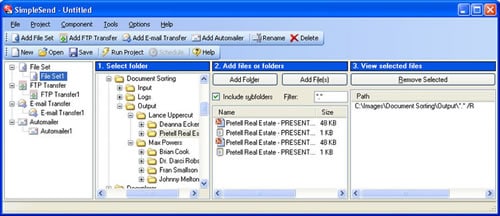
SimpleSend lets you define complex file sets for upload. These file sets can contain any type of file, whole folders or folder trees. File sets can also be defined via the command line, database query or by importing a CSV (comma separated values) or SimpleIndex IDX file. The import file is a simple delimited text file containing file paths and associated data fields. These are generated automatically by SimpleIndex or they can be exported from Excel, Access, most databases and other document scanning applications.

FTP Transfers
Each file set can be associated with its own FTP Transfer. This lets you send different files to different folders on one server, or to completely different servers in one batch. SSL support eliminates the security concerns with FTP and lets you transfer private data while complying with regulations like HIPAA.
Email Transfers
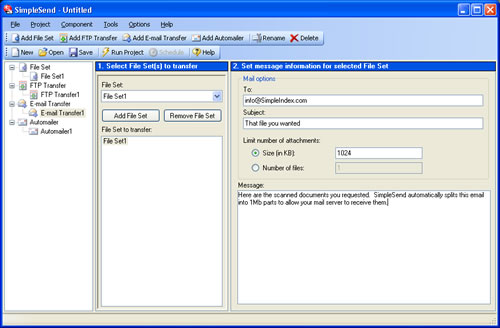
The email transfer component lets you send files to one or more recipients. Each file set can be associated with its own email component, so you can create multiple emails to multiple recipients at once. If you are importing from CSV file or database, field data can be inserted as the recipient, subject, file attachment or anywhere in the message body. Send customized email messages to hundreds of addresses, each with their own specific file attachment.
A typical example where this is useful is a mail room. SimpleCoversheet is used to create barcodes for each employee. The mail room staff opens the mail for each, places the appropriate barcode in front of each employee's mail and scans it with SimpleIndex. The entire batch may then be scanned, barcodes for each employee recognized and the files sent to their inbox automatically with SimpleSend.
Automailer Component
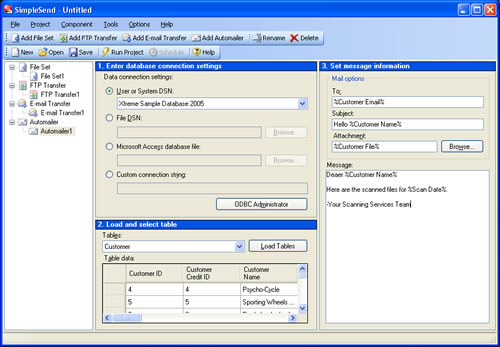
The Automailer lets you connect to a database containing a list of files and/or recipients and automatically send:
- The same file to each recipient in the database
- Each file in the database to a specific recipient list
- Each file in the database to the email address associated with that file
- A personalized message to each recipient in the database
These are the same options available for CSV files in the Email Transfer component. Use the Automailer Component to use a database as the source list of files or recipients, or to send personalized emails without files.
Though the automailer component was designed for sending multiple files to multiple recipients, it can also be used to correspond with customers listed in your custom database application. Instead of maintaining two separate databases for your email lists, SimpleSend lets you use existing data to populate recipient lists. You may also personalize each email by inserting field values from your database anywhere in the subject or body.
Freeware & Full Versions
SimpleSend is free for the needs of most users. Only advanced features like command line integration and background processing require the full version. SimpleSend will run in Full Trial mode for 30 days with all features enabled. When the Trial period is over it will continue to run in Free mode until activated.
Features | Free | Full |
| Batch upload files to FTP |  | |
| Batch email files to recipients | | |
| Batch copy files to network folders | | |
| Support for secure FTP (SSL) | | |
| Synchronize files between folders or FTP sites | | |
| Load file/data lists from delimited text files (CSV, TSV, etc.) | | |
| Load file/data lists from any database | | |
| Merge data into email header and body | | |
| Split large files into smaller files when emailing | | |
| Perform multiple file transfers or email operations in one batch | | |
| Run single jobs interactively in the application window | | |
| Run jobs from a command line | | |
| Schedule jobs to run automatically as a windows service | | |
 |
Introduction Video
Watch Other ‘University of SimpleSoftware' Videos
