
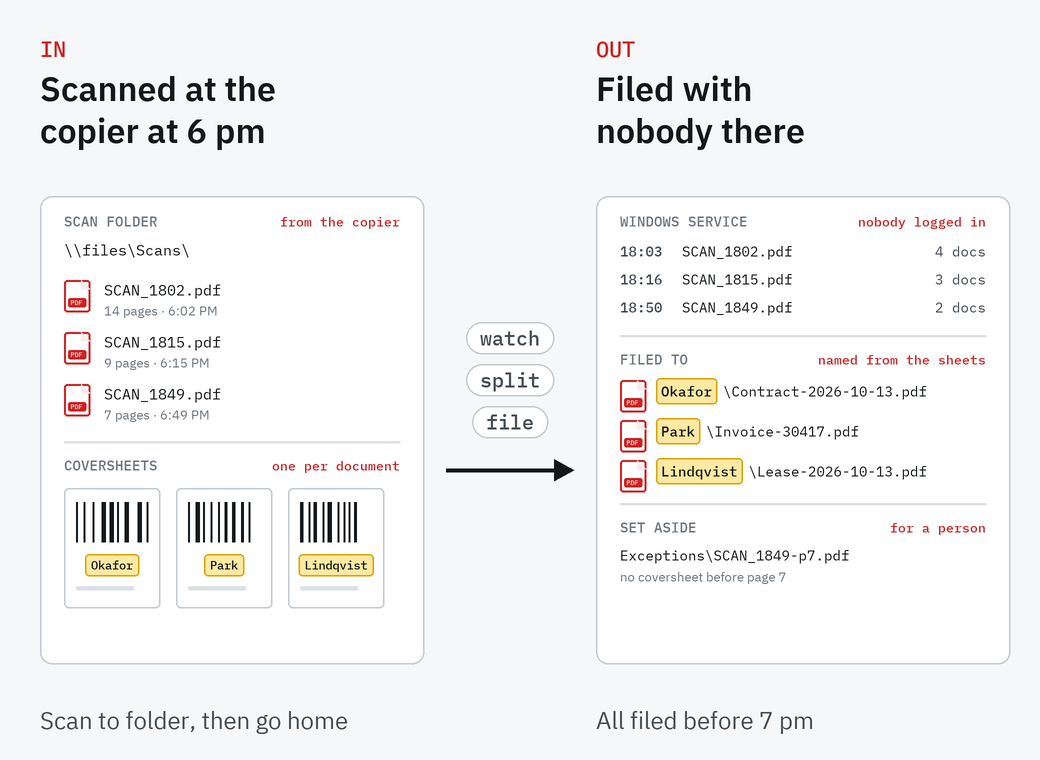
Watch the scan folder
Network folders and their subfolders, checked every few minutes (five by default) or at the times you set. Files the copier is still writing are waited for, and zip files are unpacked.
Point any network scanner or copier at a shared folder. SimpleIndex checks it on a schedule, splits the batch into documents, reads the values you file by, and names and files each one, as a Windows service with nobody logged in. It uses the copiers you already own, with no per-page capture fees on the device.
Each of these is a setting in the job, built and tested at a workstation before the service takes it over.
Network folders and their subfolders, checked every few minutes (five by default) or at the times you set. Files the copier is still writing are waited for, and zip files are unpacked.
SimpleCoversheet prints sheets carrying index values from your database. Each barcode starts a new document and sets its folder and name.
Barcodes, zone OCR, and full-page OCR for searchable PDFs. Professional adds FineReader and AI engines for printed text.
Folders and file names come from the values. Files go to your folders, SharePoint or a database.
In Professional, an email inbox is checked on the same schedule as the folders, and its attachments are processed like scans.
Unreadable files, and documents missing a required value, go to a separate folder. Errors go to the Windows event log, with an email alert if you want one.
Use the copier's own scan-to-folder setting, as PDF, TIFF or JPEG.
Set it up at a workstation and test it there, with someone watching.
Give it a schedule. Several jobs can run, each with its own folder.
Now and then, look at the folder of pages it couldn't read.
The Windows service, and as many jobs under it as you need, each with its own folder or schedule. Unattended processing is covered up to 1 million pages a year, with more bought in million-page units, and ABBYY FineReader OCR Server is included.
It is added to Standard or Professional, or bought together with an edition as one Server license. See editions and pricing.
Capture software on a network copier is usually billed per page or by subscription, and does less than expected. Let the copier scan to a folder and do the recognition on hardware you already own. The local engines have no per-page fees; see what per-page fees add up to.
Any that can scan to a network folder as PDF, TIFF or JPEG.
No. SimpleIndex runs as a Windows service, so jobs run with nobody signed in to the computer.
The folder is checked every five minutes by default. You can shorten that, or set times from hourly to monthly.
SimpleIndex waits until the file is finished before it picks it up.
They are set aside in their own folder for someone to look at, and you can get an email alert.
Standard handles barcodes and coversheets; Professional adds the OCR and AI engines for printed text. Unattended runs need a Server license with either edition.
Yes. The free trial runs as a service too.
The free trial runs the full software, unattended included, and our team in Knoxville can help you set up the first job.