
Accounts payable automation, from the invoice pile to posted bills
Most of accounts payable is retyping: vendor, invoice number, date and amount, from paper or PDF into the accounting system. SimpleIndex reads those values off each invoice, files the invoice where you can find it again, and hands the values to QuickBooks directly, or to another accounting system as a file or database it can import. It runs on your own Windows machine and is licensed once, with no per-invoice fee on the local engines.
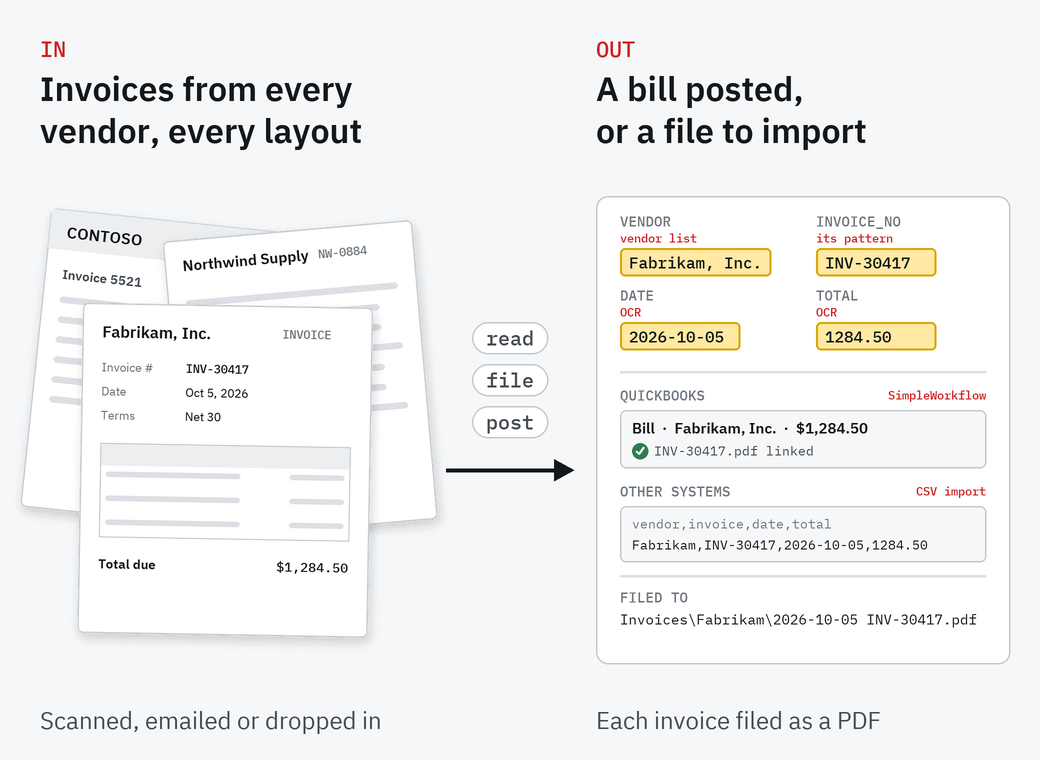
How an invoice gets posted
Bring the invoices in
Scan paper invoices, or point SimpleIndex at the folder where PDF invoices land. Professional can also take them straight from email.
Read the values
The SimpleInvoice sample job finds the vendor from your vendor list, then that vendor's invoice number by its own pattern, along with the date and total. For layouts that vary too much, Professional can send those fields to AWS Textract, Azure or a language model, including one on your own server.
File the invoice
Each invoice is saved as a searchable PDF, named by vendor, date and invoice number, in the folders you choose.
Post the bill
SimpleWorkflow posts the values to QuickBooks Online or Desktop as bills, skipping any already posted and linking the invoice file to each one. For other accounting systems, the values go to a CSV file or a database that system can import.
Do you need a robot?
For QuickBooks, no. SimpleWorkflow posts bills to QuickBooks Desktop or Online directly, with the invoice file linked to the transaction and line items from a second data source if you have them. It is included with a SimpleIndex Professional workstation license, and sold on its own for Standard.
For Xero, NetSuite, Sage or anything else without a direct integration, SimpleIndex writes the values to a CSV file or a database that the accounting system can import. If you already run an RPA tool such as UiPath, Blue Prism or Automation Anywhere, SimpleIndex works alongside it: SimpleWorkflow can start it as a workflow step, or the tool can run SimpleIndex from its command line.

The Workflow Manager with the sample job list open. Every sample capture job ships with a workflow job beside it.
Templates, not training
Most values on an invoice follow a common pattern, like a date or a total. The invoice number is the exception: every vendor formats it differently. SimpleInvoice stores each vendor's invoice-number pattern in your vendor list, so once it knows the vendor it knows what to look for. There's no model to train, and no zones to draw for every vendor.
SimpleInvoice is a sample job included with every SimpleIndex license, at no charge.
When you need more
Version 12 can read an invoice's line items as a table field, written out as CSV beside the other values. If your AP also needs GL coding, PO matching, approval workflows or thousands of vendors, an enterprise invoice processing system fits better, and we sell and set those up too.
Before you automate accounts payable
Does it work with QuickBooks Online?
Yes. SimpleWorkflow adds bills to QuickBooks Online and the US desktop editions. It is included with a SimpleIndex Professional workstation license, and sold on its own ($500) for Standard.
What about accounting systems other than QuickBooks?
SimpleIndex writes the values to a CSV file or a database that many accounting systems, such as Xero and NetSuite, can import. If you already use an RPA tool such as UiPath, Blue Prism or Automation Anywhere, SimpleWorkflow can start it as a step, or the tool can run SimpleIndex from its command line.
What does it cost?
SimpleIndex is licensed once: Standard $600, Professional $1,800. The SimpleInvoice sample job is free. If you send fields to AWS Textract or Azure, that provider bills you per page.
Do our invoices leave the network?
Not with the local engines. Invoices go to a cloud provider only if you choose to send fields to one.
Try it on last month's invoices
The free trial runs the full software, SimpleInvoice sample job included, on your own documents.